Thủ Phủ Hacker Mũ Trắng Buôn Ma Thuột

Chương trình Đào tạo Hacker Mũ Trắng Việt Nam tại Thành phố Buôn Ma Thuột kết hợp du lịch. Khi đi là newbie - Khi về là HACKER MŨ TRẮNG !

Hacking Và Penetration Test Với Metasploit

Chương trình huấn luyện sử dụng Metasploit Framework để Tấn Công Thử Nghiệm hay Hacking của Security365.

Tài Liệu Computer Forensic Của C50

Tài liệu học tập về Truy Tìm Chứng Cứ Số (CHFI) do Security365 biên soạn phục vụ cho công tác đào tạo tại C50.

Sinh Viên Với Hacking Và Bảo Mật Thông Tin

Cuộc thi sinh viên cới Hacking. Với các thử thách tấn công trang web dành cho sinh viên trên nền Hackademic Challenge.

Tấn Công Và Phòng Thủ Với BackTrack / Kali Linux

Khóa học tấn công và phòng thủ với bộ công cụ chuyên nghiệp của các Hacker là BackTrack và Kali LINUX dựa trên nội dung Offensive Security

Sayfalar

Showing posts with label Browser Password Dump. Show all posts

WebBrowserPassView v1.56 - Recover lost passwords stored in your Web browser


WebBrowserPassView is a password recovery tool that reveals the passwords stored by the following Web browsers: Internet Explorer (Version 4.0 - 11.0), Mozilla Firefox (All Versions), Google Chrome, Safari, and Opera. This tool can be used to recover your lost/forgotten password of any Website, including popular Web sites, like Facebook, Yahoo, Google, and GMail, as long as the password is stored by your Web Browser.

After retrieving your lost passwords, you can save them into text/html/csv/xml file, by using the 'Save Selected Items' option (Ctrl+S).

Using WebBrowserPassView

WebBrowserPassView doesn't require any installation process or additional DLL files. In order to start using it, simply run the executable file - WebBrowserPassView.exe

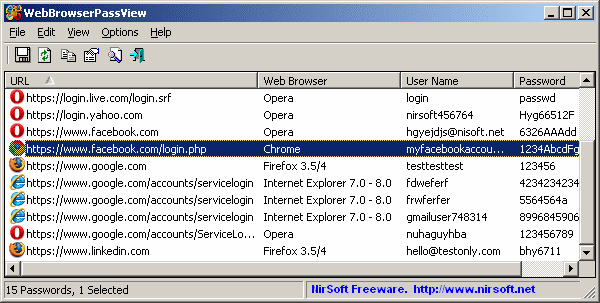
After running it, the main window of WebBrowserPassView displays the list of all Web browser passwords found in your system. You can select one or more passwords and then copy the list to the clipboard (Ctrl+C) or export them into text/xml/html/csv file (Ctrl+S). 

WebBrowserPassView - Recover lost passwords stored in your Web browser


WebBrowserPassView is a password recovery tool that reveals the passwords stored by the following Web browsers: Internet Explorer (Version 4.0 - 10.0), Mozilla Firefox (All Versions), Google Chrome, Safari, and Opera. This tool can be used to recover your lost/forgotten password of any Website, including popular Web sites, like Facebook, Yahoo, Google, and GMail, as long as the password is stored by your Web Browser.

After retrieving your lost passwords, you can save them into text/html/csv/xml file, by using the 'Save Selected Items' option (Ctrl+S). 

System Requirements And Limitations

  • This utility works on any version of Windows, starting from Windows 2000, and up to Windows 8, including 64-bit systems. Older versions of Windows (Windows 98/ME) are not supported, because this utility is a Unicode application.
  • Currently, WebBrowserPassView cannot retrieve the passwords if they are encrypted with a master password. Support for master password will probably be added in future versions.
  • Currently, WebBrowserPassView cannot retrieve passwords from external hard-drive. Support for that might be added in future versions.
  • On Internet Explorer 7.0-9.0, the passwords are encrypted with the URL of the Web site, so WebBrowserPassView uses the history file of Internet Explorer to decrypt the passwords. If you clear the history of Internet Explorer, WebBrowserPassView won't be able to decrypt the passwords.
  • On Google Chrome - passwords originally imported from Internet Explorer 7.0-9.0, cannot be decrypted. 

[Browser Password Dump v2.0] Command-line Tool to Recover Login Password from Web Browsers


Browser Password Dump is the free command-line tool to instantly recover your lost password from all the popular web browsers.

Currently it can recover stored web login passwords from following browsers.

  • Firefox
  • Internet Explorer
  • Google Chrome
  • Chrome Canary/SXS
  • CoolNovo Browser
  • Opera Browser
  • Apple Safari
  • Flock Browser
  • SeaMonkey Browser
  • Comodo Dragon Browser

It automatically discovers installed applications on your system and recovers all the stored web login passwords within seconds.

By default it dumps all the recovered passwords to console. Now with version v2.0 onwards, you can also save the passwords to TEXT file.

[Browser Password Decryptor v5.5] Software to instantly recover website login passwords stored by popular web browsers


Browser Password Decryptor is the FREE software to instantly recover website login passwords stored by popular web browsers.

Currently it can recover saved login passwords from following browsers.
  • Firefox
  • Internet Explorer
  • Google Chrome
  • Google Chrome Canary/SXS
  • CoolNovo Browser
  • Opera Browser
  • Apple Safari
  • Comodo Dragon Browser
  • SeaMonkey Browser
  • Flock Browser
For command-line version, check out our new tool - Browser Password Dump.

Features:
  • Instantly decrypt and recover stored encrypted passwords from popular web browsers.

  • Right Click Context Menu to quickly copy the password

  • Recover password of any length and complexity.

  • Automatically discovers all supported Applications and recovers all the stored passwords.

  • Sort feature to arrange the recovered passwords in various order to make it easier to search through 100's of entries.

  • Save the recovered password list to HTML/XML/Text file

  • Easier and faster to use with its enhanced user friendly GUI interface.

  • Support for local Installation and uninstallation of the software.
  

[Browser Password Dump] Tool to instantly recover your lost password from all the popular web browsers


Browser Password Dump is the free command-line tool to instantly recover your lost password from all the popular web browsers.

Currently it can recover stored web login passwords from following browsers.

  • Firefox
  • Internet Explorer
  • Google Chrome
  • Chrome Canary/SXS
  • CoolNovo Browser
  • Opera Browser
  • Apple Safari
  • Flock Browser
  • SeaMonkey Browser
  • Comodo Dragon Browser

It automatically discovers installed applications on your system and recovers all the stored web login passwords within seconds.