Thủ Phủ Hacker Mũ Trắng Buôn Ma Thuột

Chương trình Đào tạo Hacker Mũ Trắng Việt Nam tại Thành phố Buôn Ma Thuột kết hợp du lịch. Khi đi là newbie - Khi về là HACKER MŨ TRẮNG !

Hacking Và Penetration Test Với Metasploit

Chương trình huấn luyện sử dụng Metasploit Framework để Tấn Công Thử Nghiệm hay Hacking của Security365.

Tài Liệu Computer Forensic Của C50

Tài liệu học tập về Truy Tìm Chứng Cứ Số (CHFI) do Security365 biên soạn phục vụ cho công tác đào tạo tại C50.

Sinh Viên Với Hacking Và Bảo Mật Thông Tin

Cuộc thi sinh viên cới Hacking. Với các thử thách tấn công trang web dành cho sinh viên trên nền Hackademic Challenge.

Tấn Công Và Phòng Thủ Với BackTrack / Kali Linux

Khóa học tấn công và phòng thủ với bộ công cụ chuyên nghiệp của các Hacker là BackTrack và Kali LINUX dựa trên nội dung Offensive Security

Sayfalar

Showing posts with label Malware. Show all posts

MalwaRE - Malware Repository Framework


malwaRE is a malware repository website created using PHP Laravel framework, used to manage your own malware zoo. malwaRE was based on the work of Adlice team with some extra features.

If you guys have any improvements, please let me know or send me a pull request.

Features
  • Self-hosted solution (PHP/Mysql server needed)
  • VirusTotal results (option for uploading unknown samples)
  • Search filters available (vendor, filename, hash, tag)
  • Vendor name is picked from VirusTotal results in that order: Microsoft, Kaspersky, Bitdefender
  • Add writeup url(s) for each sample
  • Manage samples by tag
  • Tag autocomplete
  • VirusTotal rescan button (VirusTotal's score column)
  • Download samples from repository

Hook Analyser 3.1 - Malware Analysis Tool


Hook Analyser is a freeware application which allows an investigator/analyst to perform “static & run-time / dynamic” analysis of suspicious applications, also gather (analyse & co-related) threat intelligence related information (or data) from various open sources on the Internet.

Essentially it’s a malware analysis tool that has evolved to add some cyber threat intelligence features & mapping.


Hook Analyser is perhaps the only “free” software in the market which combines analysis of malware analysis and cyber threat intelligence capabilities. The software has been used by major Fortune 500 organisations.

Features/Functionality
  • Spawn and Hook to Application – Enables you to spawn an application, and hook into it
  • Hook to a specific running process – Allows you to hook to a running (active) process
  • Static Malware Analysis – Scans PE/Windows executables to identify potential malware traces
  • Application crash analysis – Allows you to analyse memory content when an application crashes
  • Exe extractor – This module essentially extracts executables from running process/s

CrowdInspect - Scan of your running processes on Windows with Virus Total, WOT & MHR


CrowdInspect is a free professional grade tool for Microsoft Windows systems from CrowdStrike aimed to help alert you to the presence of malware that communicates over the network that may exist on your computer. It is a host-based real-time monitoring and recording tool utilizing multiple sources of information to detect untrusted or malicious network-active processes.

The tool runs on both 32 bit and 64 bit versions of Windows from XP and above.

Beyond simple network connections, CrowdInspect associates the connection entry with the process that is responsible for that activity. It can display the process name as a simple file name or as as an optional full file path.

In addition to the process name, the entry's process ID number, local port, local IP address, remote port, remote IP address and reverse resolved DNS name of the remote IP address is shown. The tool accommodates both IPv4 and IPv6 addresses.

CrowdInspect records details of any entry that is associated with a remote IP address and maintains a chronological list of these accessed by clicking the "Live/History" toolbar button to switch between the regular live netstat window and the history list window.

Perhaps the most useful aspect of CrowdInspect though is its ability to utilize several sources of information that can be used to determine the reputation of the process using the network connection and the reputation of the domain it is connecting to. This is achieved through the use of the following technologies and services:

Thread Injection Detection

Detection of code injection using custom proprietary code

Many pieces of malware achieve part of their goal by manipulating already running applications and injecting themselves into those processes. Regular antivirus products that only act upon the actual physical file contents would not identify this behavior. CrowdInspect features experimental detection of such behavior and the results of this test on each process can be seen in the “Inject” column.

--  (o Gray icon)
Not applicable/not available. No process is not able to be tested.

??  (o Gray icon)
The process did not allow us to test for code injection.

OK  (o Green)
The process did not appear to have any evidence of thread injection.

!!  (o Red icon)
The entry appeared to have had a thread injected into its process. This is generally not a good thing or something usually encountered. Note though that there may be some classes of specialized software that does exhibit this behavior. The process/application should be investigated further.


VirusTotal

Multiple antivirus engine analysis results queried by SHA256 file hash

<http://www.virustotal.com>

Shown in the "VT" column of the tool are the basic summary results of querying the VirusTotal service against the file in question (actually the SHA256 hash of the file contents). VirusTotal utilizes multiple antivirus engines to analyze submitted files and we query its database to see if the file hash is in the database and if so, how the antivirus engines rated it. The value here can be one of the following:

--  (o Gray icon)
Not applicable/not available. No connection to the VirusTotal database was made or the process is not associated with a file.

??  (o Gray icon)
The entry does not exist in the VirusTotal database. This is probably good!

0% ... 100%  (o Green ... o Red icons)
The file is known to the VirusTotal database. This is the virus score. 0% means no antivirus vendor reported an issue with the process (very good). 100% means every antivirus vendor reported the process as problematic (very bad!)

More extensive details for the particular selected entry in the list can be seen by either clicking the "AV Results" toolbar button or selecting "View AV Test Results" from the right-click context menu for the selected item.

Note that it may take a short while before the results appear for each entry in the list due to rate throttling of connections to the service.


Team Cymru - Malware Hash Repository

Repository of known malware queried by MD5 file hash

<http://www.teamcymru.com>

Shown in the "MHR" column, Team Cymru maintains a repository of known malware that can be queried given an MD5 hash of the file contents. In this case we are simply querying for a yes/no answer so the results can be one of the following:

--  (o Gray icon)
Not applicable/not available. No response was received from the Team Cymru service or the process is not associated with a file.

??  (o Gray icon)
The entry does not exist in the MHR database. This is probably good, although the absence of a positive response doesn't necessarily mean the process is not malware.

!!  (o Red icon)
The entry DOES exist in the MHR database. The process is known to be malware. This is bad!


Web of Trust

Crowd-sourced domain name reputation system

<http://www.mywot.com>

Shown in the "WOT" column column of the tool are the basic summary results of querying the Web of Trust service against the reverse resolved domain name associated with the remote IP address of the connection's entry. The value here can be one of the following:

--  (o Gray icon)
Not applicable/not available. No connection to the WoT database was made or the entry's remote IP address does not have a usable valid domain name associated with it.

??  (o Gray icon)
The entry does not exist in the WoT database.

0% ... 100%  (o Red ... o Green icons)
The WoT reputation score. 0% means that everybody who has rated this domain thinks it is untrustworthy. 100% means that everybody who has rated this domain thinks it is reputable and can be trusted.


To avoid unnecessary querying of the above services all results are cached such that no unique process or domain is ever queried more than once for the duration the tool is running.


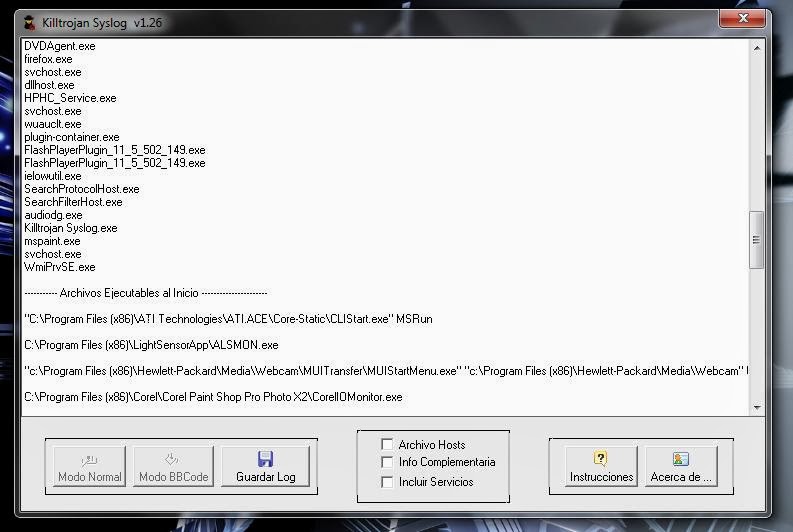
[Killtrojan Syslog] Tool to detect malware activity on a system


Killtrojan Syslog is a free application to create a report about characteristics of the system to further analyze and look for signs of malware, also is intended to put the report in a specialized forum for users to help.

The tool has a very intuitive and easy to use for non-technical users to create their reports. Also useful for more advanced users who want to analyze a computer.

With the support logs with BBCode mode, you can paste the log generated in any forum (SMF, PHPBB, Invision ...) which will be detailed with clear colors for your reading.


[Malheur v0.5.4] Malware Analyzer


Malheur is a tool for the automatic analysis of malware behavior (program behavior recorded from malicious software in a sandbox environment). It has been designed to support the regular analysis of malicious software and the development of detection and defense measures. Malheur allows for identifying novel classes of malware with similar behavior and assigning unknown malware to discovered classes.

Analysis of malware behavior?

Malheur builds on the concept of dynamic analysis: Malware binaries are collected in the wild and executed in a sandbox, where their behavior is monitored during run-time. The execution of each malware binary results in a report of recorded behavior. Malheur analyzes these reports for discovery and discrimination of malware classes using machine learning.

Malheur can be applied to recorded behavior of various format, as long as monitored events are separated by delimiter symbols, for example as in reports generated by the popular malware sandboxes CWSandbox, Anubis, Norman Sandbox and Joebox
.

[Comodo Instant Malware Analysis] Online Automated Analysis System


If you have a suspicious file, please submit it online by using the form below. Once the file is submitted, COMODO Automated Analysis System will scan it and report back its findings.


[Anubis] Online Analyzing Unknown Binaries

Anubis is a service for analyzing malware.

Submit your Windows executable or Android APK and receive an analysis report telling you what it does. Alternatively, submit a suspicious URL and receive a report that shows you all the activities of the Internet Explorer process when visiting this URL. 


[Malware Classifier] Malware Analysis Tool


Adobe Malware Classifier is a command-line tool that lets antivirus analysts, IT administrators, and security researchers quickly and easily determine if a binary file contains malware, so they can develop malware detection signatures faster, reducing the time in which users' systems are vulnerable.
Malware Classifier uses machine learning algorithms to classify Win32 binaries – EXEs and DLLs – into three classes: 0 for “clean,” 1 for “malicious,” or “UNKNOWN.”

The tool was developed using models resultant from running the J48, J48 Graft, PART, and Ridor machine-learning algorithms on a dataset of approximately 100,000 malicious programs and 16,000 clean programs. 

The tool extracts seven key features from an unknown binary, feeds them to one of the four classifiers or all of them, and presents its classification of the unknown binary.


[VirusTotal] Online Malware Analysis Tool


VirusTotal, a subsidiary of Google, is a free online service that analyzes files and URLs enabling the identification of viruses, worms, trojans and other kinds of malicious content detected by antivirus engines and website scanners. At the same time, it may be used as a means to detect false positives, i.e. innocuous resources detected as malicious by one or more scanners.

VirusTotal’s mission is to help in improving the antivirus and security industry and make the internet a safer place through the development of free tools and services.


[Malcom] Malware Communication Analyzer


Malcom is a tool designed to analyze a system's network communication using graphical representations of network traffic. This comes handy when analyzing how certain malware species try to communicate with the outside world.

Malcom can help you:
  • detect central command and control (C&C) servers
  • understand peer-to-peer networks
  • observe DNS fast-flux infrastructures
  • quickly determine if a network artifact is 'known-bad'

The aim of Malcom is to make malware analysis and intel gathering faster by providing a human-readable version of network traffic originating from a given host or network. Convert network traffic information to actionable intelligence faster.

Check the wiki for a Quickstart and some nice screenshots.

In the near future, it will also become a collaborative tool (coming soon!)

[Pyew v2.2] A Python tool for static malware analysis


Pyew is a (command line) python tool to analyse malware. It does have support for hexadecimal viewing, disassembly (Intel 16, 32 and 64 bits), PE and ELF file formats (it performs code analysis and let you write scripts using an API to perform many types of analysis), follows direct call/jmp instructions in the interactive command line, displays function names and string data references; supports OLE2 format, PDF format and more. It also supports plugins to add more features to the tool.


Pyew have been successfully used in big malware analysis systems since almost 2 years, processing thousand of files daily.

See some usage examples, example batch scripts or a tool to compare and group programs (PE and ELF) using the API provided by Pyew.

NOTE: It's highly recommended to always use the Mercurial version instead of the versions available in the Downloads section.

ChangeLog:

Version 2.2 Stable (12-30-2012)
  • Loads of bug fixes.
  • Many little enhancements to the x86 code analysis engine, notoriously increasing the overall speed and finding more functions and basic blocks missed in previous versions.
  • Updated PEFile version to 1.2.10.
  • Support for 2 more disassembly engines: diStorm v3 and pymsasid (pure python disassembler).
  • Automatic calculation of the application call graph and function's flow graphs.
  • Support for analysing x86 boot sector files.

Version 2.1 Beta (11-27-2011)
  • Added Kenshoto's VTrace.
  • Initial support for integrated debugging.
  • Good support for ELF file format (both 32 and 64 bits).
  • Code analysis engine enhanced.
  • Fixed a lot of bugs.

Version 2.0
  • Code analysis system for x86 rewritten from scratch.
  • Support for databases. You can analyze binaries (PE or ELF) and save/open databases.
  • Added graph's based clusterization tool 'gcluster.py'.
  • Added new PDF utilities:
    • pdfss: Seek to one stream
    • pdfobj: Show object's list
    • pdfso: Seek to one object
  • Added new plugins:
    • binvi: Show an image representing the contents of the file. Usefull to see different sections in a binary.
    • packer: Check if the PE file is packed
    • cgraph: Show the callgraph of the whole program (needs PyGTK to show a GUI).
  • Many bug fixes.

Version 1.1.1
  • Support for ELF file formats (AMD64 and IA32) using the Kenshoto's ELF library (VTrace).
  • Code analysis by recursively traversing all possible code paths from entry points.
  • Added the following APIS:
    • resolveName: Resolves the internal name of the given address/offset.
    • NextHead: Return the next disassembly offset given an address/offset.
    • GetMnem/GetMnems: Returns the mnemonic or mnemonic list given an offset and the number of mnemonics to retrieve.

Pyew is very similar in some aspects to the following tools:
  • The Interactive Disassembler (IDA). Although Pyew does not compete with IDA (and the author of the tool doesn't want it at all), it can be considered as a "mini IDA" focused on batch malware analysis.
  • The almighty radare.
  • The open source Biew and the commercial Hiew

[MISP v2.1] Malware Information Sharing Platform


The problem that we experienced in the past was the difficulty to exchange information about (targeted) malwares and attacks within a group of trusted partners, or a bilateral agreement. Even today much of the information exchange happens in unstructured reports where you have to copy-paste the information in your own text-files that you then have to parse to export to (N)IDS and systems like log-searches, etc…
A huge challenge in the Cyber Security domain is the information sharing inside and between organizations. This platform has as goal to facilitate:

  • central IOC database: storing technical and non-technical information about malwares and attacks, … Data from external instances is also imported into your local instance
  • correlation: automatically creating relations between malwares, events and attributes
  • storing data in a structured format (allowing automated use of the database for various purposes)
  • export: generating IDS, OpenIOC, plain text, xml output to integrate with other systems (network IDS, host IDS, custom tools, …)
  • import: batch-import, import from OpenIOC, GFI sandbox, ThreatConnect CSV, …
  • data-sharing: automatically exchange and synchronization with other parties and trust-groups

Exchanging info results in faster detection of targeted attacks and improves the detection ratio while reducing the false positives. We also avoid reversing similar malware as we know very fast that others already worked on this malware.

[Hook Analyser 2.5] Application (and Malware) Analysis tool


Application (and Malware) Analysis tool. Hook Analyser is a hook tool which could be potentially helpful in reversing application and analysing malwares.


Changelog v2.5

This has now five (5) key functionalities:
  1. Spawn and Hook to Application – This feature allows analyst to spawn an application, and hook into it. The module flow is as following -
    1. PE validation (with XOR bruteforce)
    2. Static malware analysis.
    3. Other options (such as pattern search or dump all)
    4. Type of hooking (Automatic, Smart or manual)
    5. Spawn and hook

Currently, there are three types of hooking being supported –
  • Automatic – The tool will parse the application import tables, and based upon that will hook into specified APIs
  • Manual – On this, the tool will ask end-user for each API, if it needs to be hooked.
  • Smart – This is essentially a subset of automatic hooking however, excludes uninteresting APIs.

2. Hook to a specific running process-The option allows analyst to hook to a running (active) process. The program flow is –
  1. List all running process
  2. Identify the running process executable path.
  3. Perform static malware analysis on executable (fetched from process executable path)
  4. Other options (such as pattern search or dump all)
  5. Type of hooking (Automatic, Smart or manual)
  6. Hook to a specific running process
  7. Hook and continue the process

3. Static Malware Analysis – This module is one of the most interesting and useful module of Hook Analyser, which performs scanning on PE or Widows executables to identify potential malware traces. The sub-components have been mentioned below (and this is not the full list) -
  1. PE file validation (with XOR bruteforce)
  2. CRC and timestamps validation
  3. PE properties such as Image Base, Entry point, sections, subsystem
  4. TLS entry detection.
  5. Entry point verification (if falls in suspicious section)
  6. Suspicious entry point detection
  7. Packer detection
  8. Signature trace (extended from malware analyser project), such as Anti VM aware, debug aware, keyboard hook aware etc. This particular function searches for more than 20 unique malware behaviours (using 100’s of signature).
  9. Import intel scanning.
  10. Deep search (module)
    Online search of MD5 (of executable) on Threat Expert.
  11. String dump (ASCII)
  12. Executable file information
  13. Hexdump
  14. PEfile info dumping
  15. …and more.

4. Application crash analysis – This module enables exploit researcher and/or application developer to analyse memory content when an application crashes.This module essentially displays data in different memory register (such as EIP).

5. Exe extractor – This module essentially extracts executables from running process/s, which could then be further analysed using Hook Analyser , Malware Analyser or other solutions. This module is potentially useful for incident responders

More Information:

[REMnux] A Linux Distribution for Malware Analysis

REMnux incorporates a number of tools for analyzing malicious executables that run on Microsoft Windows, as well as browser-based malware, such as Flash programs and obfuscated JavaScript. This popular toolkit includes programs for analyzing malicious documents, such PDF files, and utilities for reverse-engineering malware through memory forensics.

REMnux can also be used for emulating network services within an isolated lab environment when performing behavioral malware analysis. As part of this process, the analyst typically infects another laboratory system with the malware sample and redirects the connections to the REMnux system listening on the appropriate ports.

You can learn the malware analysis techniques that make use of the tools installed and pre-configured on REMnux by taking the Reverse-Engineering Malware course that my colleagues and I teach at SANS Institute.

REMnux focuses on the most practical freely-available malware analysis tools that run on Linux. If you are looking for a more full-featured distribution that incorporates a broader range of digital forensic analysis utilities, take a look at SANS Investigative Forensic Toolkit (SIFT) Workstation.

Originally released in 2010, REMnux has been updated to version 4 in April 2013.


What’s New in REMnux v4

REMnux is now available as a Open Virtualization Format (OVF/OVA) file for improved compatibility with virtualization software, including VMware and VirtualBox. (Here’s how to easily install the REMnux virtual appliance.) A proprietary VMware file is also available. You can also get REMnux as an ISO image of a Live CD.

Key updates to existing tools and components:

New tools added to REMnux:

Getting Started With REMnux

The one-page REMnux Usage Tips cheat sheet outlines some of the more popular tools installed on REMnux. Feel free to customize it to incorporate your own tips and tricks.

The recorded Malware Analysis Essentials Using REMnux webcast provides a good overview and examples of some of the tools for performing static malware analysis.

If you find REMnux useful, take a look at the reverse-engineering malware course. It makes use of REMnux and various other tools.

[Dexter] A Free Tool for Mobile (Android) Malware Analysis


Bluebox Labs just released Dexter, a free tool which wants to help information security professionals and malware analysts to analyze Android mobile applications in order to find malware and vulnerabilities.


Dexter combines manual and automatic static program analysis to provide a better understanding of an Android application. Since the original application source code is not required, Dexter is useful during third party binary application analyses and malware reverse engineering.


The following core features are provided to the analyst:
  • App statistics and direct access to all program entry points
  • Package graph visualization
  • Class and inheritance diagrams
  • Class decompilation
  • Method bytecode graph visualization
  • A relational query language and text search feature
  • APK file browser
  • Coloring, tagging and commenting on package, class, method and even basic block layer
  • String listing including code cross reference resolution
  • Automated semantic annotation of program elements
  • Integrated multi-user support for collaboration

More info Here.

[Hook Analyser v2.4] Application (and Malware) Analysis tool


Application (and Malware) Analysis tool. Hook Analyser is a hook tool which could be potentially helpful in reversing application and analysing malwares.


Changelog v2.4
  • Hook Analyser can now analyse DLLs. (Part of the Static Malware Analysis Module)
  • The deep trace functionality has been improved significantly, and now it supports searching (and logging) for traces such as Shellcodes, Filenames, WinSockets, Compiler Traces etc.(Part of the Static Malware Analysis Module)
  • Exe extractor – This is one of the feature which is useful for incident handlers, essentially allows dumping of executables from process/s, which could then be analysed using Hook Analyser, Malware Analyser or other tools for anomalies check. (New module added)
  • The static malware analysis has been further improved, and new features have been added. I will let you explore this.(Part of the Static Malware Analysis Module)
  • Minor bug fixes.

More Information: