Thủ Phủ Hacker Mũ Trắng Buôn Ma Thuột

Chương trình Đào tạo Hacker Mũ Trắng Việt Nam tại Thành phố Buôn Ma Thuột kết hợp du lịch. Khi đi là newbie - Khi về là HACKER MŨ TRẮNG !

Hacking Và Penetration Test Với Metasploit

Chương trình huấn luyện sử dụng Metasploit Framework để Tấn Công Thử Nghiệm hay Hacking của Security365.

Tài Liệu Computer Forensic Của C50

Tài liệu học tập về Truy Tìm Chứng Cứ Số (CHFI) do Security365 biên soạn phục vụ cho công tác đào tạo tại C50.

Sinh Viên Với Hacking Và Bảo Mật Thông Tin

Cuộc thi sinh viên cới Hacking. Với các thử thách tấn công trang web dành cho sinh viên trên nền Hackademic Challenge.

Tấn Công Và Phòng Thủ Với BackTrack / Kali Linux

Khóa học tấn công và phòng thủ với bộ công cụ chuyên nghiệp của các Hacker là BackTrack và Kali LINUX dựa trên nội dung Offensive Security

Sayfalar

Showing posts with label WiFi Password Decryptor. Show all posts

[WiFi Password Decryptor v3.0] Wireless Password Recovery Software


WiFi Password Decryptor is the FREE software to instantly recover Wireless account passwords stored on your system.

It automatically recovers all type of Wireless Keys/Passwords (WEP/WPA/WPA2 etc) stored by Windows Wireless Configuration Manager.

For each recovered WiFi account, it displays following information
  • WiFi Name (SSID)
  • Security Settings (WEP-64/WEP-128/WPA2/AES/TKIP)
  • Password Type
  • Password in Hex format
  • Password in clear text
After the successful recovery you can save the password list to HTML/XML/TEXT/CSV file. You can also right click on any of the displayed account and quickly copy the password.

Under the hood, 'WiFi Password Decryptor' uses System Service method (instead of injecting into LSASS.exe) to decrypt the WiFi passwords. This makes it more safer and reliable. Also it makes us to have just single EXE to work on both 32-bit & 64-bit platforms.

[WiFi Password Decryptor] Wireless Password Recovery Software


WiFi Password Decryptor is the FREE software to instantly recover Wireless account passwords stored on your system.

It automatically recovers all type of Wireless Keys/Passwords (WEP/WPA/WPA2 etc) stored by Windows Wireless Configuration Manager.
For each recovered WiFi account, it displays following information
  • WiFi Name (SSID)
  • Security Settings (WEP-64/WEP-128/WPA2/AES/TKIP)
  • Password Type
  • Password in Hex format
  • Password in clear text
After the successful recovery you can save the password list to HTML/XML/TEXT file. You can also right click on any of the displayed account and quickly copy the password.

Under the hood, 'WiFi Password Decryptor' uses System Service method (instead of injecting into LSASS.exe) to decrypt the WiFi passwords. This makes it more safer and reliable. Also it makes us to have just single EXE to work on both 32-bit & 64-bit platforms.

[WiFi Password Decryptor] Free Wireless Password Recovery Software


WiFi Password Decryptor is the FREE software to instantly recover Wireless account passwords stored on your system.

It automatically recovers all type of Wireless Keys/Passwords (WEP/WPA/WPA2 etc) stored by Windows Wireless Configuration Manager.
For each recovered WiFi account, it displays following information
  • WiFi Name (SSID)
  • Security Settings (WEP-64/WEP-128/WPA2/AES/TKIP)
  • Password Type
  • Password in clear text
After the successful recovery you can save the password list to HTML/XML/TEXT file. You can also right click on any of the displayed account and quickly copy the password.
Under the hood, 'WiFi Password Decryptor' uses System Service method (instead of injecting into LSASS.exe) to decrypt the WiFi passwords. This makes it more safer and reliable. Also it makes us to have just single EXE to work on both 32-bit & 64-bit platforms.

It has been successfully tested on Windows Vista and higher operating systems including Windows 8.

How to Use?

WiFiPasswordDecryptor is easy to use with its simple GUI interface. 

Here are the brief usage details
  • Launch WiFiPasswordDecryptor on your system
  • Next click on 'Start Recovery' button and all stored WiFi account passwords will be recovered & displayed as shown in screenshot 1 below.
  • You can right click on any of the displayed account to quickly copy the password
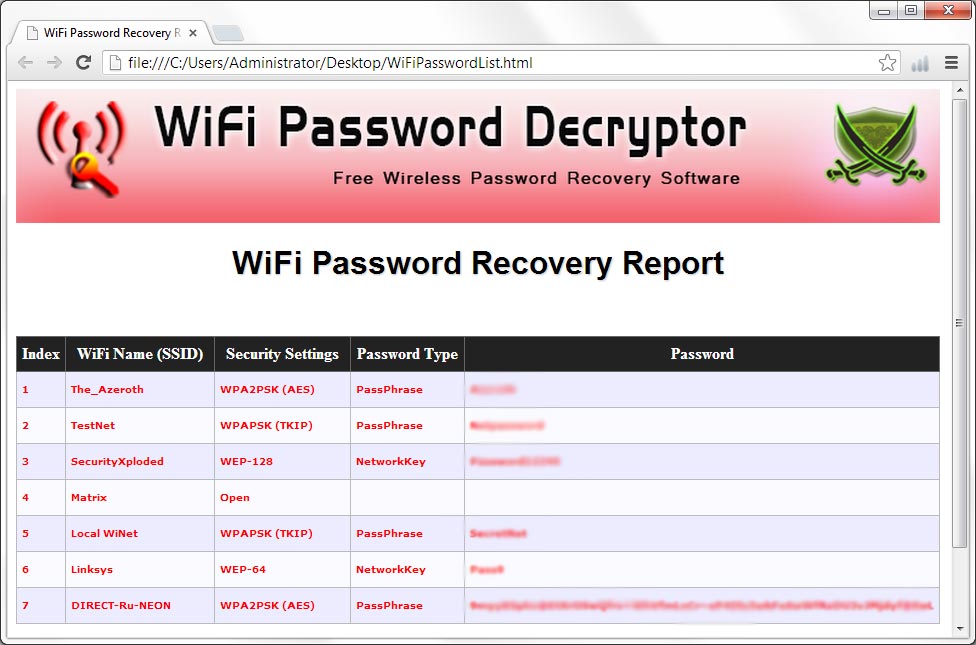
  • Also can generated detailed password recovery report in HTML/XML/Text format by clicking on 'Export' button and then select the type of file from the drop down box of 'Save File Dialog'.
Note that you need to have administrative privileges to run this tool.

Limitations

This tool can recover the WiFi Passwords configured by Windows Wirelss Configuration Manager only. Also it does not work on older operating systems like Windows XP, 2003.It works well with Vista & all the higher versions.
Screenshots

Here are the screenshots of WiFiPasswordDecryptor
Screenshot 1: WiFi Password Decryptor showing all the Recovered WiFi account Passwords.
WiFiPasswordDecryptor showing recovered passwords


Screenshot 2: Detailed HTML report of all the recovered WiFi account Passwords
WiFiPasswordDecryptor

Download WiFi Password Decryptor