Thủ Phủ Hacker Mũ Trắng Buôn Ma Thuột

Chương trình Đào tạo Hacker Mũ Trắng Việt Nam tại Thành phố Buôn Ma Thuột kết hợp du lịch. Khi đi là newbie - Khi về là HACKER MŨ TRẮNG !

Hacking Và Penetration Test Với Metasploit

Chương trình huấn luyện sử dụng Metasploit Framework để Tấn Công Thử Nghiệm hay Hacking của Security365.

Tài Liệu Computer Forensic Của C50

Tài liệu học tập về Truy Tìm Chứng Cứ Số (CHFI) do Security365 biên soạn phục vụ cho công tác đào tạo tại C50.

Sinh Viên Với Hacking Và Bảo Mật Thông Tin

Cuộc thi sinh viên cới Hacking. Với các thử thách tấn công trang web dành cho sinh viên trên nền Hackademic Challenge.

Tấn Công Và Phòng Thủ Với BackTrack / Kali Linux

Khóa học tấn công và phòng thủ với bộ công cụ chuyên nghiệp của các Hacker là BackTrack và Kali LINUX dựa trên nội dung Offensive Security

Sayfalar

[SET Version 5.0] The Social-Engineer Toolkit "The Wild West"


Social-Engineer Toolkit (SET) v5.0 codename: The Wild West is a culmination of six months of development, bug squashing, and user feedback. New with this version includes a completely redesigned multiprocessing web server that handles non-rfc compliant HTTP information. The builtin SET web server would on occasion crash when receiving unexpected characters. The new version of the web server is stable, and significantly faster. This version if Kali Linux compliant (FSH) where all information is now moved and removed from src/program_junk and to your ~/.set home directory.

In addition to FSH structuring of SET, we have also added some significant performance and stability updates. For example, traditionally if you launched an attack, you would have to exit out of SET completely then relaunch. The dynamic importing has now changed to fix this and improve the ability to reuse modules.
For a full list of changes, the changelog can be found below:

~~~~~~~~~~~~~~~~
version 5.0
~~~~~~~~~~~~~~~~
* fixed a bug that would cause tabnabbing to throw an exceptions around check_options
* added setcore modules into tabnabbing to allow centralized routines
* fixed a bug that would cause webjacking to throw an exeptions around check_options
* added git clean -fd prior to set update, this will force a clean when pulling the latest files
* fixed a bug that would cause a system not setup properly when installing in setup.py
* fixed a bug on start_dns() upon launch will cause errors on certain systems
* added installation script for putting SET into /usr/bin and /usr/share for FSH compliant installer
* added set-update to the installation path, can type that anywhere now
* added set-automate to the list to be typed in anywhere
* fixed a bug that would cause the java applet method to not work a second time in use (reload)
* rewrote MASSIVE amounts of code to no longer use src/program_junk for storage of applications, its now all under ~./set
* fixed a os.chdir issue when using it to spawn a web server during java applet, moved to multi processing instead of threading.thread
* fixed a bug that caused credential harvester to throw an exceptions with the new ~./.set directory structure
* centralized setdir into the main repository to handle it through there and to call the ~/.set directory
* added additional passwords to wordlist.txt used for fast-track mssql brute forcing
* fixed a mssql access bug that would cause fast-track to error out if unspecified IP was added
* removed the pymssql check from the initial SET start and onto Fast-Track since it’s only used there
* turned java repeater to ON by default, much better success rate in SE pentesting
* rewrote large portions of payloadgen to incorporate the changes to the new ~/.set path variables
* added a new file structure to launch set called se-toolkit. The set executable is now depricated and should no longer be used – to launch set just type ./se-toolkit
* updated the setup.py installation to be more robust when performing installations (windows, etc.)
* moved all of the reporting structures within SET to the new ~/.set directory
* added a checkup routine in set and se-toolkit to check for the reports directory
* fixed a bug that would cause multi powershell injection to trigger even when using the powershell menu, it will just generate one now
* fixed an issue that could cause powershell injection to not work properly using the fast patch method
* fixed an issue that would cause definepath to not be specified when using the SE Toolkit Interactive shell
* fixed relative path issues in sccm_main and powershell teensy vectors to point to new .set directory
* fixed an issue that would cause the SE toolkit to hang on a weird bug when importing binascii – moved binascii to main import above and no longer hung
* fixed a before assignment error when using the windows debug conversion in the fast-track mssql menu (meta_path reference)
* changed reports directory within the teensy side to move to ~/.set/reports
* moved the report_generator in harvester to pull and report on the new ~/.set reports structure
* fixed an issue where webjacking would not post properly on certain websites (index2.html conflict issue)
* added the Metasploit MS13-009-IE SLayoutrun Use After Free Exploit to the Metasploit Brwoser Exploit attacks
* fixed a parsing issue with the JMX bean exploit in the SET menu text from appearing to be on one line
* added a new description on setting up sendmail for Kali Linux
* added a check for multi powershell injection and check for solo instances through powershell teensy and not to generate a ton
* changed the email handler from control-c to END instead. Control-C will break multiprocessing within src.html.spawn and this is the proper way to do it
* cleaned up setcore with old code and optimized other areas of the code base
* reduced the description of the allports payload when selecting in web attack method
* added a completely new and redesigned multi threaded and multiprocessing web server – should be significantly faster with less bugs and crashing when handling non-rfc compliant HTTP requests
* optimized applet load time to be much more efficent when being loaded into the web attack vector (about 4 seconds improvement)
* rewrote exceptions handler for the new web server to check to see if anything is running on port 80 when starting
* turned java repeater to on by default – more stable and tested on multiple platforms
* fixed an issue that would cause the java applet web cloner to fail upon running it twice – added reload(module) option to fix the bug
* fixed an issue that caused powershell.prep to not load if used twice
* fixed an import error when using powershell injection through the main menu
* changed initial set menu in powershell to be the standard setprompt
* changed the default port to 443 on powershell delivery in the set option number 10
* fixed an issue that would cause the powershell injection to spawn on port 22 versus 443 as specified
* removed the man left in the middle attack – no longer in use, outdated and not maintained
* removed beautifulsoup as a dependancy for SET due to the removal of man left in the middle
* added the ability to call the web server and stop it based on stop_server()

[Topera] The IPv6 port scanner invisible to Snort (IDS)


Topera is a brand new TCP port scanner under IPv6, with the particularity that these scans are not detected by Snort.

Snort is the most known IDS/IPS and is widely used in many different critical environments. Some commercial tools (Juniper or Checkpoint ones) use it as detection engine also.

Mocking snort detection capabilities could suppose a high risk in some cases.

All the community is invited to test it in any environment and we would be thankful if you send us any feedback.

We keep researching on the security implications that the "new" IPv6 protocol will have in different environments. 


You can see an example of execution of Topera here: 
Download Topera

[Canari Framework] Maltego Rapid Transform Development Framework


Canari is a rapid transform development framework for Maltego written in Python. The original focus of Canari was to provide a set of transforms that would aid in the execution of penetration tests, and vulnerability assessments. Ever since it's first prototype, it has become evident that the framework can be used for much more than that. Canari is perfect for anyone wishing to graphically represent their data in Maltego without the hassle of learning a whole bunch of unnecessary stuff. It has generated interest from digital forensics analysts to pen-testers, and even psychologists.

Canari's core features include:        - An easily extensible and configurable framework that promotes maximum reusability;      - A set of powerful and easy-to-use scripts for debugging, configuring, and installing transforms; -Finally, a great number of community provided transforms. 

[REMnux] A Linux Distribution for Malware Analysis

REMnux incorporates a number of tools for analyzing malicious executables that run on Microsoft Windows, as well as browser-based malware, such as Flash programs and obfuscated JavaScript. This popular toolkit includes programs for analyzing malicious documents, such PDF files, and utilities for reverse-engineering malware through memory forensics.

REMnux can also be used for emulating network services within an isolated lab environment when performing behavioral malware analysis. As part of this process, the analyst typically infects another laboratory system with the malware sample and redirects the connections to the REMnux system listening on the appropriate ports.

You can learn the malware analysis techniques that make use of the tools installed and pre-configured on REMnux by taking the Reverse-Engineering Malware course that my colleagues and I teach at SANS Institute.

REMnux focuses on the most practical freely-available malware analysis tools that run on Linux. If you are looking for a more full-featured distribution that incorporates a broader range of digital forensic analysis utilities, take a look at SANS Investigative Forensic Toolkit (SIFT) Workstation.

Originally released in 2010, REMnux has been updated to version 4 in April 2013.


What’s New in REMnux v4

REMnux is now available as a Open Virtualization Format (OVF/OVA) file for improved compatibility with virtualization software, including VMware and VirtualBox. (Here’s how to easily install the REMnux virtual appliance.) A proprietary VMware file is also available. You can also get REMnux as an ISO image of a Live CD.

Key updates to existing tools and components:

New tools added to REMnux:

Getting Started With REMnux

The one-page REMnux Usage Tips cheat sheet outlines some of the more popular tools installed on REMnux. Feel free to customize it to incorporate your own tips and tricks.

The recorded Malware Analysis Essentials Using REMnux webcast provides a good overview and examples of some of the tools for performing static malware analysis.

If you find REMnux useful, take a look at the reverse-engineering malware course. It makes use of REMnux and various other tools.

[ExploitSearch.net] Exploit / Vulnerability Search Engine


Exploitsearch.net, is an attempt at cross referencing/correlating exploits and vulnerability data from various sources and making the resulting database available to everyone. 

Unlike other exploit search engines which are simply custom google searches, this site actually crawls the source databases/websites and parses the contained data. Once the data is collected and parsed, it is inserted into the www.exploitsearch.net database and becomes available for searching. 


[Panoptic] Automates the process of search and retrieval of content for common log and config files through LFI vulnerability


Panoptic is an open source penetration testing tool that automates the process of search and retrieval of content for common log and config files through LFI vulnerability. Official introductionary post can be found here. Also, you can find a sample run here.


Help Menu

Usage: panoptic.py --url TARGET [options]

Options:
-h/--help show this help message and exit
-v/--verbose display extra output information
-u/--url=URL set target URL
-p/--param=PARAM set parameter name to test for (e.g. "page")
-d/--data=DATA set data for HTTP POST request (e.g. "page=default")
-t/--type=TYPE set type of file to look for ("conf" or "log")
-o/--os=OS set filter name for OS (e.g. "*NIX")
-s/--software=SOFT.. set filter name for software (e.g. "PHP")
-c/--category=CATE.. set filter name for category (e.g. "FTP")
-l/--list=GROUP list available filters for group (e.g. "software")
-a/--auto avoid user interaction by using default options
-w/--write-files write content of retrieved files to output folder
-x/--skip-parsing skip special tests if *NIX passwd file is found
--ignore-proxy ignore system default HTTP proxy
--proxy=PROXY set proxy (e.g. "socks5://192.168.5.92")
--user-agent=UA set HTTP User-Agent header value
--random-agent choose random HTTP User-Agent header value
--cookie=COOKIE set HTTP Cookie header value (e.g. "sid=foobar")
--header=HEADER set a custom HTTP header (e.g. "Max-Forwards=10")
--prefix=PREFIX set prefix for file path (e.g. "../")
--postfix=POSTFIX set postfix for file path (e.g. "")
--multiplier=MULTI.. set multiplication number for prefix (e.g. 10)
--bad-string=STRING set a string occurring when file is not found
--replace-slash=RE.. set replacement for char / in paths (e.g. "/././")
--update update Panoptic from official repository

Examples

./panoptic.py --url "http://localhost/lfi.php?file=test.txt"
./panoptic.py --url "http://localhost/lfi.php?file=test.txt&id=1" --param file
./panoptic.py --url "http://localhost/lfi.php" --data "file=test.txt&id=1" --param file

./panoptic.py --list software
./panoptic.py --list category
./panoptic.py --list os

./panoptic.py -u "http://localhost/lfi.php?file=test.txt" --os Windows
./panoptic.py -u "http://localhost/lfi.php?file=test.txt" --software WAMP

[SAMHAIN v3.0.11 & BELTANE v2.4.6] Host-based intrusion detection system (HIDS)


The Samhain host-based intrusion detection system (HIDS) provides file integrity checking and log file monitoring/analysis, as well as rootkit detection, port monitoring, detection of rogue SUID executables, and hidden processes.

Samhain been designed to monitor multiple hosts with potentially different operating systems, providingcentralized logging and maintenance, although it can also be used as standalone application on a single host.

Samhain is an open-source multiplatform application for POSIX systems (Unix, Linux, Cygwin/Windows).

Changelog


SAMHAIN v3.0.11
  • Log rotation is handled more gracefully now under favourable conditions (logfile is moved so inode is kept, and it does not get compressed immediately).
  • Debian client packages can be created with a preset password now (this was possible for RPMs since 3.0.8).
  • An option IgnoreModified has been added to cover transient files that not only get added/deleted but also modified during their lifetime.
  • An option KernelCheckProc has been added to suppress the kernel /proc test.
  • Large groups are handled better now.
  • A compile error on HP-UX has been fixed.
  • Reconnecting to a temporarily unavailable Oracle database has been fixed.

BELTANE v2.4.6
Version 2.4.6 of the Beltane II web frontend has been released.

Changes:
  • Better detection of setup problems (e.g. missing PHP posix module).
  • Minor UI improvements.

[Viproy] VoIP Penetration Testing Kit


Viproy Voip Pen-Test Kit is developed to improve quality of SIP Penetration Tests. It provides authentication feature that helps to create simple tests. It includes 7 different modules with authentication support: options tester, brute forcer, enumerator, invite tester, trust analyzer, proxy and registration tester. All attacks could perform before and after authentication to fuzz SIP services and value added services.

SIP Pen-test guide will be published soon. Basic Usage of Modules are presented below, it can be used before guide. All modules have DEBUG and VERBOSE supports.

Project Page : http://adf.ly/145rtj

[ShellSave v1.0] Manten todas tus Shells ordenadas y en un sólo lugar


La idea de crear la ShellSave surge de la propia necesidad de contener de forma ordenada nuestra lista de backdoors web y evitar agendarlos en archivos de texto lo cuál es poco comodo a la hora de realizar una busqueda.

La ShellSave se encarga de ordenarlos de una manera prolija, trabajando mano a mano con una db y obteniendo datos a travez de la url pasada, tales como: ip, nombre del host y geolocalizacion del mismo.


Otra de las carácteristicas que posee es la de incluir a travez de un iframe la webshell selecciónada, esto se podría aprovechar montando el script en un servidor web para luego usarlo de próxy tras realizar la petición a nuestro backdoor.


Como ven se trata de una herramienta super sencilla pero que a la vez resulta de gran utilidad tras la post explotación de uno o varios objetivos.

  • El proceso de instalación es simple.
  • Crear una base de datos e importar el archivo sql que se encuentra en el directorio bd
  • Editar el fichero config.php con los datos correspondientes
  • Loguearse dentro de la ShellSave con el password por defecto “test”
  • Agendar nuestras webshells.


Web oficial: http://underterminal.nixiweb.com

[Spoon] Ejecutar aplicaciones en Sandbox Online


El proyecto Spoon.net Browser Sandbox permite ejecutar cualquier navegador en una Sandbox y realizar pruebas de compatibilidad con versiones anteriores de los mismos... así como abrir páginas web que podrían ser peligrosas.

Los navegadores se ejecutan dentro de un entorno virtual aislado, lo que elimina la necesidad de instalaciones. Los navegadores virtualizados se comportan exactamente igual que los navegadores instalados y, debido a que se ejecutan localmente, se puede probar aplicaciones web alojadas en servidores internos. Simplemente basta con abrir el navegador de Spoon y escribir la dirección en la barra de navegación de prueba.


Spoon es compatible con componentes estándar como Applets de Java, controles ActiveX, y Flash, así como con plugins populares como Firebug, Developer Toolbar IE y consolas de depuración de CSS y JavaScript.

Adicionalmente Spoon permite ejecutar una lista muy grande de aplicaciones de escritorio virtualizadas y se puede instalar en modo servidor.


[Evil Foca (Alpha Version)] Herramienta para probar la seguridad en redes de datos IPv4 / IPv6


Evil Foca (Alpha Version) es una herramienta para pentester y auditores de seguridad que tiene como fin poner a prueba la seguridad en redes de datos IPv4 / IPv6.
La herramienta es capaz de realizar distintos ataques como:

  • MITM sobre redes IPv4 con ARP Spoofing y DHCP ACK Injection.
  • MITM sobre redes IPv6 con Neighbor Advertisement Spoofing, Ataque SLAAC, fake DHCPv6.
  • DoS (Denegación de Servicio) sobre redes IPv4 con ARP Spoofing.
  • DoS (Denegación de Servicio) sobre redes IPv6 con SLAAC DoS.
  • DNS Hijacking.

Automáticamente se encarga de escanear la red e identificar todos los dispositivos y sus respectivas interfaces de red, especificando sus direcciones IPv4 e IPv6 y las direcciones físicas.

Evil Foca está dividida en 4 paneles, a la izquierda el panel encargado de mostrar los equipos encontrados en la red, donde se podrá agregarlos a mano, y filtrar los resultados obtenidos.

El segundo panel, dispuesto en el centro con todos los posibles ataques a realizar con la herramienta, y a su derecha una breve descripción de cada uno de ellos.

Colocado bajo el panel anterior, se muestran los ataques que se están realizando, su configuración y su estado, permitiendo activarlo o desactivarlo.

Por último, el panel inferior donde se imprime un log de los eventos de la Evil Foca.


[Ghost Phisher] GUI suite for phishing and penetration attacks


Ghost Phisher is a Wireless and Ethernet security auditing and attack software program written using the Python Programming Language and the Python Qt GUI library, the program is able to emulate access points and deploy various internal networking servers for networking, penetration testing and phishing attacks.


Operating System Supported

The Software runs on any Linux machine with the programs prerequisites, But the program has been tested on the following Linux based operating systems:

Prerequisites

The Program requires the following to run properly:
The following dependencies can be installed using the Debian package installer command on Debian based systems using "apt-get install program" or otherwise downloaded and installed manually

Features


Ghost Phisher currently supports the following features:

  • HTTP Server
  • Inbuilt RFC 1035 DNS Server
  • Inbuilt RFC 2131 DHCP Server
  • Webpage Hosting and Credential Logger (Phishing)
  • Wifi Access point Emulator
  • Session Hijacking (Passive and Ethernet Modes)
  • ARP Cache Poisoning (MITM and DOS Attacks)
  • Penetration using Metasploit Bindings
  • Automatic credential logging using SQlite Database
  • Update Support

Installation

Installation on Debian Package supported systems:

root@host:~# dpkg -i ghost-phisher_1.5_all.deb


The source code for the program can be fetched using the following command on terminal

root@host:~# svn checkout http://ghost-phisher.googlecode.com/svn/Ghost-Phisher/

[Hackersh] Free shell (command interpreter) written in Python

Hackersh ("Hacker Shell") is a free and open source (license) shell (command interpreter) written in Python with Pythonect-like syntax, builtin security commands, and out of the box wrappers for various security tools. It is like Unix pipeline, but for processing security information and metadata rather than bytes.


Download Hackersh version 0.1
Web: http://www.hackersh.org/

[HoneyDrive Desktop v0.2] Honeypot LiveCD


HoneyDrive is a virtual appliance (OVA) with Xubuntu Desktop 12.04 32-bit edition installed. It contains various honeypot software packages such as Kippo SSH honeypot, Dionaea malware honeypot, Honeyd low-interaction honeypot, Glastopf web honeypot along with Wordpot, Thug honeyclient and more. Additionally it includes useful pre-configured scripts and utilities to analyze, visualize and process the data it can capture, such as Kippo-Graph, Honeyd-Viz, and much more. Lastly, many other helpful security, forensics and malware related tools are also present in the distribution.

FEATURES:
  • Virtual appliance based on Xubuntu 12.04 Desktop.
  • Distributed as a single OVA file, ready to be imported.
  • Full LAMP stack installed (Apache 2, MySQL 5), plus tools such as phpMyAdmin.
  • Kippo SSH honeypot, plus Kippo-Graph, Kippo2MySQL and other helpful scripts.
  • Dionaea malware honeypot, plus DionaeaFR and other helpful scripts.
  • Amun malware honeypot, plus helpful scripts.
  • Kojoney SSH honeypot, plus helpful scripts.
  • Glastopf web honeypot, along with Wordpot WordPress honeypot.
  • Honeyd low-interaction honeypot, plus Honeyd2MySQL, Honeyd-Viz and other helpful scripts.
  • LaBrea sticky honeypot, Tiny Honeypot, IIS Emulator and INetSim.
  • Thug honeyclient for client-side attacks analysis, along with mwcrawler malware collector.
  • A full suite of security, forensics and anti-malware tools for network monitoring, malicious shellcode and PDF analysis, such as ntop, p0f, EtherApe, nmap, DFF, Wireshark, ClamAV, ettercap, Automater, UPX, pdftk, Flasm, pdf-parser, Pyew, dex2jar and more.
  • Firefox plugins pre-installed, plus extra helpful software such as GParted, Terminator, Adminer, VYM, Xpdf and more.

INSTALLATION:

After downloading the file, you simply have to import the virtual appliance to your virtual machine manager/hypervisor (suggested software: Oracle VM VirtualBox). If you want to use HoneyDrive in VMware products (Workstation, ESXi, etc) please read this: Setup HoneyDrive on VMware.


[AppUse] Android Pentest Platform Unified Standalone Environment


AppSec Labs recently developed the AppUse Virtual Machine. This system is a unique, free, platform for mobile application security testing in the android environment, and it includes unique custom-made tools created by AppSec Labs.

There is no need for installation of simulators and testing tools, no need for SSL certificates of the proxy software, everything comes straight out of the box pre-installed and configured for an ideal user experience.Security experts who have seen the machine were very excited, calling it the next ‘BackTrack’ (a famous system for testing security problems), specifically adjusted for android application security testing. 

AppUse VM closes gaps in the world of security, now there is a special and customized testing environment for android applications. 

This machine is intended for the daily use of security testers everywhere for Android applications, and is a must-have tool for any security person. 

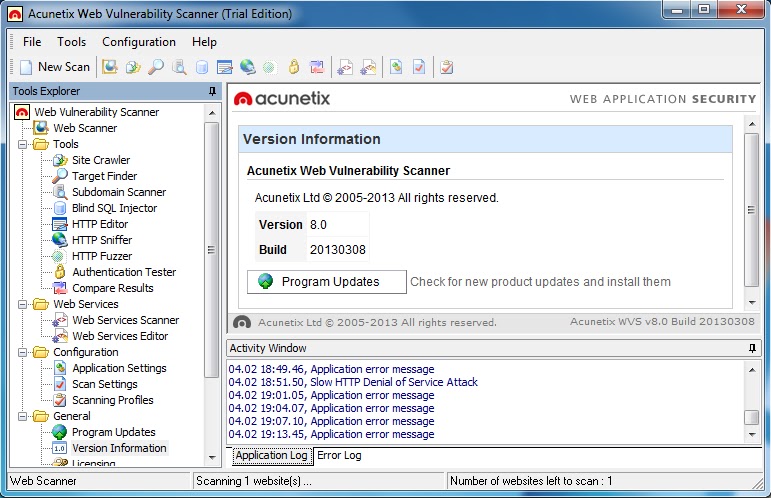
[Acunetix Web Vulnerability Scanner 8] Automated Web Application Security Testing Tool


Acunetix Web Vulnerability Scanner (WVS) is an automated web application security testing tool that audits your web applications by checking for exploitable hacking vulnerabilities. Automated scans may be supplemented and cross-checked with the variety of manual tools to allow for comprehensive web site and web application penetration testing.


Changelog v8.20130308

Unicode Transformation Issues
This new security test is looking for issues that can occur when working with Unicode data. Specifically, it is looking for Best-Fit mappings, Overlong byte sequences and Ill-Formed Subsequences issues.

Best-Fit Mappings occurs when a character X gets transformed to an entirely different character Y. For example, in some situations the Unicode character U+FF1C FULLWIDTH LESS-THAN SIGN can be transformed into U+003C LESS-THAN SIGN (<). This can cause serious security problems for the affected web application.

Overlong byte sequences (non-shortest form) – UTF-8 allows for different representations of characters that also have a shorter form. For security reasons, a UTF-8 decoder must not accept UTF-8 sequences that are longer than necessary to encode a character. For example, the character U+000A (line feed) must be accepted from a UTF-8 stream only in the form 0x0A, but not in any of the following five possible overlong forms:
  • 0xC0 0x8A
  • 0xE0 0×80 0x8A
  • 0xF0 0×80 0×80 0x8A
  • 0xF8 0×80 0×80 0×80 0x8A
  • 0xFC 0×80 0×80 0×80 0×80 0x8A

Ill-Formed Subsequences - As REQUIRED by UNICODE 3.0, and noted in the Unicode Technical Report #36, the web application should not consume a leading byte when it is followed by an invalid successor byte. For example, at some point PHP was consuming the control characters leading to XSS and SQL injection vulnerabilities.

Analyze Parameter Values
Another script introduced with this update is Analyze_Parameter_Values.script. This script is analyzing parameter values and performs various actions based on their values. For example, if the parameter value contains a filename or a file path, the script will pass this information to the crawler and these files will be crawled and tested in the next scan iteration.

Hidden Virtual Hosts
Finally, the latest update contains a script that is trying to find hidden Virtual Hosts on the tested web server. Virtual hosting is a method for hosting multiple domain names on a single web server.
Sometimes developers hosts internal/test applications on production systems without making them public. These virtual hosts are not directly accessible unless you guess the name of their virtual host, connect to the web server’s IP address and specify the virtual host in the Host header.
This script is looking for common Virtual Host names and compares the responses received with the normal response. When it finds differences, it will issue alerts for these names.


Full Changelog: here
More Information:

[Binwalk v1.2] Firmware Analysis Tool

Binwalk is a tool for searching a given binary image for embedded files and executable code. Specifically, it is designed for identifying files and code embedded inside of firmware images. Binwalk uses the libmagic library, so it is compatible with magic signatures created for the Unix file utility.

Binwalk also includes a custom magic signature file which contains improved signatures for files that are commonly found in firmware images such as compressed/archived files, firmware headers, Linux kernels, bootloaders, filesystems, etc.

Changelog v1.2

  • Recursive File Scanning and Extraction: Often files extracted by binwalk need to be further scanned / analyzed.
  • Entropy and Strings Analysis: Binwalk’s signature analysis is great, but how do you know it didn’t miss something? What do you do if binwalk doesn’t find anything at all? Examining a file’s entropy can reveal a lot about its contents
  • Plugin Support: In addition to a scriptable API, binwalk now supports plugins that are afforded considerable control over binwalk’s scan process. Plugins are particularly useful for extending or modifying binwalk’s analysis where custom signatures fall short.
Plugins are easy to write; check out some of the examples on the wiki!

Full Changelog: here

[360-FAAR v0.4.1] Firewall Analysis Audit And Repair


360-FAAR (Firewall Analysis Audit and Repair) is an offline, command line, Perl firewall policy manipulation tool to filter, compare to logs, merge, translate and output firewall commands for new policies, in Checkpoint dbedit, Cisco ASA or ScreenOS commands, and its one file!

Changes: This release adds the 'mergelog' mode to merge binary log entries from one config with another and significantly updates the user interface. All configs can be loaded from the 'load' menu instead of specifying them on the command line. Added 'verbose' switches to 'print' and 'rr' modes so that screen output can be switched off, and all 'end.' key words have been changed to simply '.' to reduce the number of keystrokes needed. Entering '0' now adds all options and '.' chooses the default if available. The Netscreen output stage now uses a default zone if none are specified.
Read Policy and Logs for:
Checkpoint FW1 (in odumper.csv / logexport format),
Netscreen ScreenOS (in get config / syslog format),
Cisco ASA (show run / syslog format),

360-FAAR uses both inclusive and exclusive CIDR and text filters, permitting you to split large policies into smaller ones for virutalisation at the same time as removing unused connectivity.

360-FAAR supports, policy to log association, object translation, rulebase reordering and simplification, rule moves and duplicate matching automatically. Allowing you to seamlessly move rules to where you need them.

Download 360-FAAR Firewall Analysis Audit And Repair 0.4.1


[Bluelog v1.1.1] Simple Bluetooth Scanner

Bluelog is a simple Bluetooth scanner designed to tell you how many discoverable devices there are in an area as quickly as possible.

It is intended to be used as a site survey tool, identifying the number of possible Bluetooth targets there are in the surrounding environment.


Changelog v1.1.1

Codename: “Marshmallow Peep Edition”
  • Merged in libmackerel
  • Merged in MACLIST from haraldscan
  • Experimental manufacturer lookups (currently x86 only)
  • Configuration options broken out into config.h
  • Allow for friendly class names in verbose mode, thanks Dean
  • EXPERIMENTAL: Added -e option to encode MACs with CRC32
  • Updated MAN page
  • Updated README
  • Improved memory management, thanks Paolo
  • Improved file cleanup, less idiotic

Compatibility
Bluelog has been written with portability and efficiency in mind, so it is able to run on a number of systems and hardware platforms. Basically, as long as the device can run (and get results from) “hcitool scan”, and you can compile software for it, there is a good chance Bluelog can run on it.

In addition to running on all major Linux distributions, Bluelog has been used successfully on Chrome OS (running on the CR-48 netbook), and MIPS based OpenWRT devices. For information on the OpenWRT build of Bluelog, see the “openwrt” directory.

More Information: here

Download Bluelog v1.1.1

[iKAT 2013] Interactive Kiosk Attack Tool


iKAT was designed to aid security consultants with the task of auditing the security of internet Kiosk terminals. iKAT is designed to provide access to the underlying operating system of a Kiosk terminal by invoking native OS functionality.


iKAT 2013

New Additions
iKAT 2013 is generally a refinement of the iKAT software, with a smoother exploitation path – more exploits, and better compatibility.

New Features:
  • The iKAT Girl is back!!
  • New Download Methods for each of the iKAT Tools
  • Smoother / Faster exploitation
  • Many resolved bugs and issues
  • Refined and updated tools

iKAT Desktop
iKAT Desktop is easy to use and only requires an installation of Metasploit. Once installed, iKAT will start its own web server and a back-end Metasploit server instance.

It should be noted that the Desktop version of iKAT has several restrictions, but is otherwise fully functional and will give you the same experience as the online version of iKAT.


iKAT PwnMap
Information where was possible getting shell, the level of access gained and the OS in

use on the remote host. The iKAT PWNMap is available at http://ikat.ha.cked.net/pwnmap

iKAT Pro / iKAT Live
iKAT Desktop and the iKAT Website now feature the infamous ‘iKAT Girl‘ – a half-naked girl who acts as a hacking deterrent.

iKAT Professional is a discreet version of iKAT Desktop, featuring more technological advancements, more exploits, more browser add-on’s and a completely discreet professional look.

If you want to be using iKAT on a client site, you need iKAT Professional.

iKAT Live is a subscription based model to an online version of iKAT Professional, for those who do not need their own iKAT Professional instance locally – but still require the technological advancements, and the discreet design.

Currently both products are in pre-release, and you can register your interest at http://ikat.ha.cked.net/store to receive a discount when they become available.

Download iKAT 2013

[HookME] TCP Proxy (Data tamper)


HookME es un software diseñado para la interceptación de las comunicaciones hookeando el proceso deseado e interceptando las llamadas del API para el envío y recepción de tráfico de red (incluso SSL). HookMe proporciona una interfaz gráfica de usuario que permite cambiar el contenido del paquete en tiempo real, o descartar o reenviarlo. También cuenta con un sistema de plugins en python para ampliar la funcionalidad HookMe.
Se puede utilizar para muchos propósitos, tales como:

  • Analizar y modificar protocolos de red
  • Creación de malware o backdoors embebidos en protocolos de red
  • Parcheo de vulnerabilidades de memoria de protocolos
  • Firewall a nivel de protocolo
  • Como herramienta postexplotation
  • Lo que quiera tu imaginación creando plugins

En el siguiente video podemos ver como crear un backdoor usando HookME y plugins en python que son inyectados en el proceso mysqld.exe permitiendo al atacante ejecutar comandos remotos:


Download HookME