Thủ Phủ Hacker Mũ Trắng Buôn Ma Thuột

Chương trình Đào tạo Hacker Mũ Trắng Việt Nam tại Thành phố Buôn Ma Thuột kết hợp du lịch. Khi đi là newbie - Khi về là HACKER MŨ TRẮNG !

Hacking Và Penetration Test Với Metasploit

Chương trình huấn luyện sử dụng Metasploit Framework để Tấn Công Thử Nghiệm hay Hacking của Security365.

Tài Liệu Computer Forensic Của C50

Tài liệu học tập về Truy Tìm Chứng Cứ Số (CHFI) do Security365 biên soạn phục vụ cho công tác đào tạo tại C50.

Sinh Viên Với Hacking Và Bảo Mật Thông Tin

Cuộc thi sinh viên cới Hacking. Với các thử thách tấn công trang web dành cho sinh viên trên nền Hackademic Challenge.

Tấn Công Và Phòng Thủ Với BackTrack / Kali Linux

Khóa học tấn công và phòng thủ với bộ công cụ chuyên nghiệp của các Hacker là BackTrack và Kali LINUX dựa trên nội dung Offensive Security

Sayfalar

Showing posts with label Social Network. Show all posts

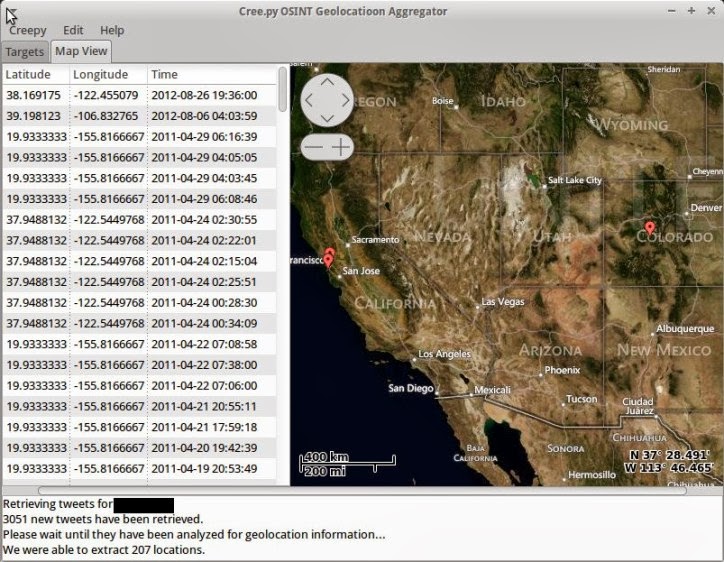
[Creepy] Geolocation information Gathering through Social Networking Platforms


Creepy is a geolocation OSINT tool. Gathers geolocation related information from online sources, and allows for presentation on map, search filtering based on exact location and/or date, export in csv format or kml for further analysis in Google Maps.

What's new in v1.0.x ?

  • Creepy now uses Qt 4, via it's PyQt4 bindings for the user interface.
  • Analysis in based on projects, you can work with multiple targets simultaneously without having to re-analyze them.
  • Creepy is extensible via plugins for online services that might hold geolocation information. See Creepy Plugins Repository
  • Plugins for twitter, instagram and flickr are included in this release
  • Easy plugin configuration with wizards, where applicable
  • After analysis, the retrieved locations can be filtered based on the date that they were created or the proximity to a certain location
  • Google maps is used as a maps provider ( Street view included within Creepy ! )

Quick Start Instructions

  • Download creepy ( source code or the installers provided here for your platform )
  • Configure twitter and instagram plugins. Edit -> Plugins Configuration -> Twitter / Instagram and run the wizards, following the instructions
  • Create a new project : Creepy -> New Project -> Person Based Project . Search for the target selecting the available plugins.
  • Right click on the project -> Analyze Current Project
  • Wait :)
  • The locations will be drawn on the map, once the analysis is complete.
  • Filter locations, export locations, view them on the map.

[Social Password Dump] Command-line Tool to Recover Social Network Password from Browsers and Messengers


Social Password Dump is the free command-line based all-in-one tool to recover your lost password for all social networks like Facebook, Twitter, Pinterest etc.

Currently it can recover passwords for following popular Social Networks,

  • Facebook
  • Twitter
  • Google Plus
  • Linkedin
  • Pinterest
  • Myspace
  • Badoo

It can instantly find and decrypt your stored password from all the popular web browsers and messengers.
Here is the complete list of supported applications,
  • Firefox
  • Internet Explorer (v6.x - v10.x)
  • Google Chrome
  • Chrome Canary/SXS
  • CoolNovo Browser
  • Opera Browser
  • Apple Safari
  • Flock Browser
  • SeaMonkey Browser
  • Comodo Dragon Browser
  • Paltalk Messenger
  • Miranda Messenger

It automatically discovers all these installed applications on your system and recovers all the stored social network login passwords within seconds.